Nudge had been doing its job quietly for three years. Macs got prompted, people updated, nothing complained. With macOS 27 out, Apple deprecating the old ways of managing software updates, and a security fix we wanted on every Mac running 26, it was time to look at the whole setup rather than just bump the date again.
When I went looking for help, there was plenty on the web about installing Nudge for the first time. For moving an existing 1.x setup to 2.x there are the official v2.0 features page, the changelog and a scattering of forum threads about individual symptoms, but I could not find an end-to-end migration guide. This is the guide I wanted: what to check before you upgrade, what changes when you do, and how we rolled it out.
Scope note. Everything here was done on a Jamf Pro (cloud) fleet of Apple silicon Macs on 12 November 2026, moving from Nudge 1.1.11 to 2.1.4. Where I describe how Nudge behaves internally, I read it in Nudge's own source for both versions and say so; where I only infer something, I say that too.
Everything here is done: Nudge 2.1.4 is on the fleet, and the new requirements went live on 16 November. I will add how the deadline went after 30 November.
It Wasn't Broken: Why Overhaul It
If it ain't broke, don't fix it. Nudge wasn't broken. But three things had changed around it:
- macOS 27 shipped, and we wanted a deliberate plan for it rather than whatever Software Update offered on the day.
- Apple has deprecated managing updates through MDM restrictions in favour of declarative (DDM) software update settings. Our deferral settings use the old method.
- macOS 26.7.3 fixed an actively exploited issue and also cleaned up the command-line certificate store after the eMudhra incident. We wanted every Mac on 26 to have it, with a sensible deadline.
Looking properly turned up one thing that would have bitten us the moment we updated Nudge. That is the first section that matters.
What We Started With
- Nudge 1.1.11.81465, installed in February 2023 by a Jamf policy set to Once per computer on all computers: a logos package, the Nudge Suite package, then Update Inventory. Nudge's settings had been updated over the years (logos, the "More Info" link, the required version and date). The app itself had not, because a once-per-computer policy never runs again.
- One requirement in a Jamf configuration profile: macOS 26.7.1 by 15 December, with
targetedOSVersionsRuleset to14. - Software update deferrals through a Restrictions payload: 7 days for major, minor and non-OS updates.
To capture the same picture on one of your Macs:
defaults read /Applications/Utilities/Nudge.app/Contents/Info.plist CFBundleShortVersionString
sudo defaults read "/Library/Managed Preferences/com.github.macadmins.Nudge"
sudo defaults read "/Library/Managed Preferences/com.apple.applicationaccess" | grep -iE 'defer|delay|forceDelayed'
log show --last 2d --predicate 'subsystem == "com.github.macadmins.Nudge"' --style compact | tail -20
Check This First: targetedOSVersionsRule
Our only requirement had targetedOSVersionsRule = 14. The profile was named "to 14.x to 26.7.1", and the intention was "Macs on 14 and below get prompted up to 26". It looked like it worked: older Macs were prompted. But the log on a Mac already on 26.7.1 said this:
Current operating system (26.7.1) is greater than or equal to required operating system (26.7.1)
Device is fully updated
A Mac on 26 was being measured against a rule written for 14. The reason is in Nudge 1.1.11's source: when no rule matches the Mac's version and there is no default rule, the first unmatched rule is used as the fallback (Preferences.swift at tag v1.1.11.81465). So a 14 rule quietly applied to every Mac.
Nudge 2.x does not do that. In the current source, only a rule set to default (or with no rule at all) is a fallback. A 14 rule matches Macs on 14 and nothing else. Upgrade Nudge with a config like ours and every Mac on 13, 15 or 26 ends up with no requirement and no prompt, with no error to tell you. (That last part is from reading the code; I fixed the rule before upgrading rather than test it.)
The fix is one word, and it is safe to make on 1.1.11 first, because 1.1.11 already treats the rule as a fallback:
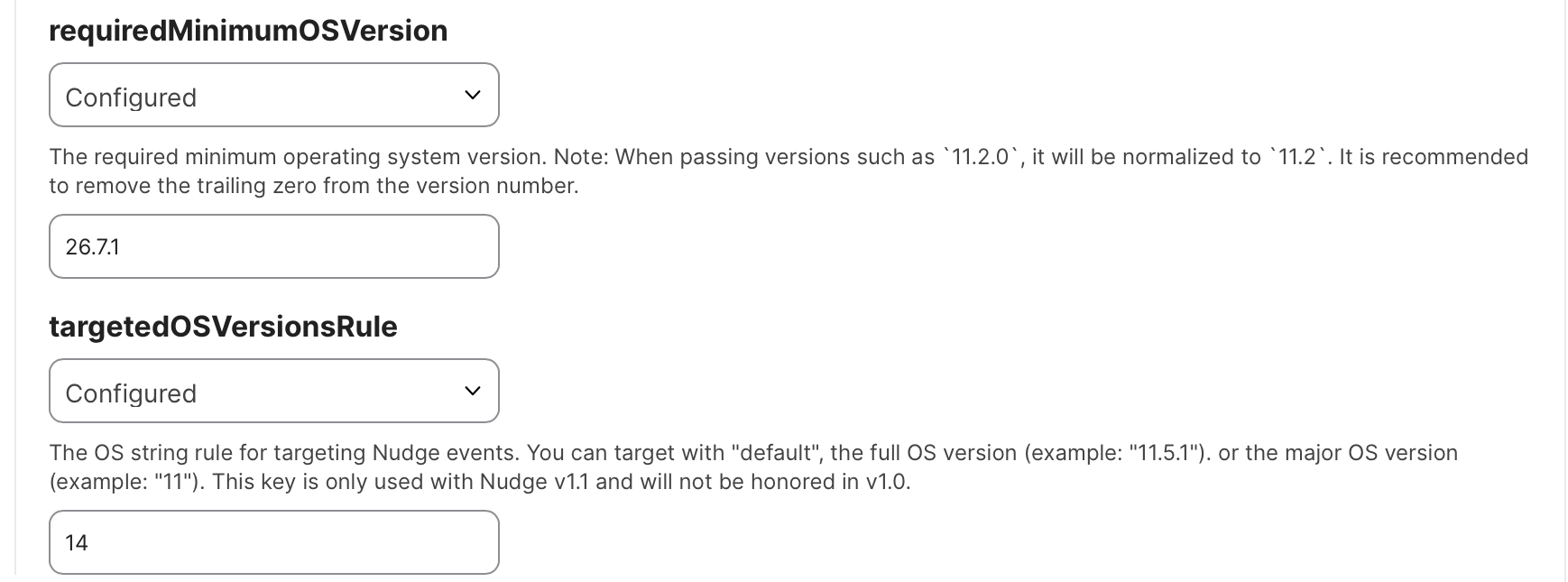
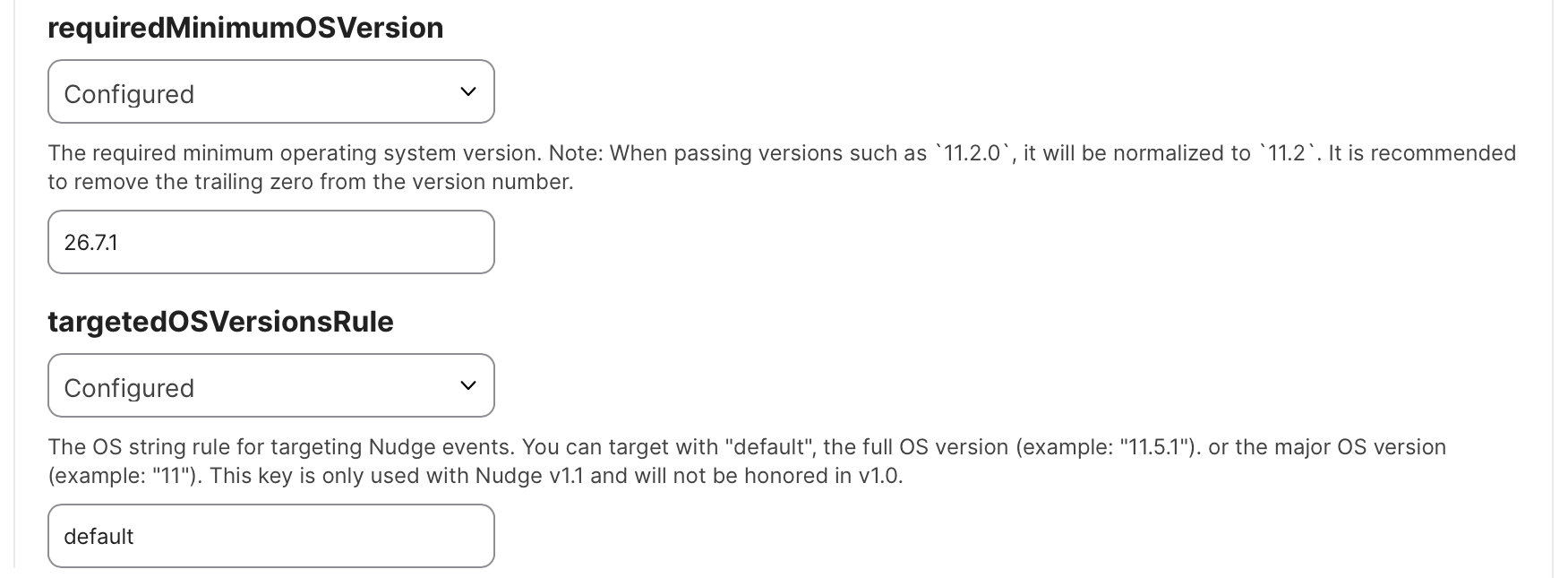
After saving and a Blank Push, the Mac showed targetedOSVersionsRule = default; and a manual run of Nudge 1.1.11 gave exactly the same result as before. No visible change, which was the point.
Checking and Uploading Nudge 2.1.4
Nudge 2.1.4 was published on 8 September 2026. GitHub marks it as the latest release, though its release notes describe it as a pre-release build made by GitHub Actions, so check the releases page for anything newer before you start. Download Nudge_Suite-2.1.4.81863.pkg from the Nudge releases page: the Suite package, which includes the LaunchAgent and the logging daemon, like the 1.x Suite. Check it before it goes anywhere near Jamf:
pkgutil --check-signature ~/Downloads/Nudge_Suite-2.1.4.81863.pkgOurs reported a Developer ID Installer certificate for Mac Admins Open Source (T4SK8ZXCXG), notarised, timestamped 8 September. T4SK8ZXCXG is the same Team ID we already approve in our Managed Login Items profile (see the browser updates guide), so Nudge 2's background items were approved from the start.
Two things worth knowing about the package: it does not touch /Library/Application Support/Nudge/, so custom logos placed there survive the upgrade (checked in the build script and on the Macs), and its postinstall reloads the LaunchAgent, so the new version is running straight away.
In Jamf, upload it under Settings → Computer management → Packages, and put your own notes in Notes, not Info; Info is shown when the package is deployed.
Pilot on One Mac
A separate policy, Update Nudge Suite to 2.1.4: the package, Update Inventory, a Recurring Check-in trigger plus a custom trigger (updatenudge) for testing, once per computer, scoped to one Mac. Then:
sudo jamf policy -event updatenudge
defaults read /Applications/Utilities/Nudge.app/Contents/Info.plist CFBundleShortVersionString
ls -l "/Library/Application Support/Nudge/"
sudo sfltool dumpbtm | grep -B4 -A3 "com.github.macadmins.Nudge" | grep -E "Identifier|Flags|Team"
Version 2.1.4.81863, logos untouched, and the app and LaunchAgent showing managed under T4SK8ZXCXG. The log still read "Device is fully updated" against the default rule, which is the proof the rule change carries across versions.
We also added an Extension Attribute, so Jamf can report the version on every Mac:
#!/bin/zsh
v=$(/usr/bin/defaults read /Applications/Utilities/Nudge.app/Contents/Info.plist CFBundleShortVersionString 2>/dev/null)
echo "<result>${v:-Not installed}</result>"
What 2.x Changes by Default
Three behaviours change even with an identical profile. All three are in the 2.1.4 source, and we saw each in the logs:
| Setting | 1.1.11 default | 2.1.4 default | What you notice |
|---|---|---|---|
randomDelay | off | on, up to 1,200 seconds | "Delaying initial run (in seconds) by: 774". Prompts no longer appear exactly on the hour or half hour. |
utilizeSOFAFeed | not present | on | Nudge downloads Apple update data from the Mac Admins SOFA feed and shows Actively Exploited CVEs: True when the update fixes something exploited in the wild. Macs now contact sofafeed.macadmins.io. |
| Grace periods | simpler | event-based (2.1.4 change) | "Installation grace ended - update requirements changed; honoring event deadline". Changing a requirement ends any grace and resets deferrals. |
The same Mac, before and after the upgrade, with the same profile:
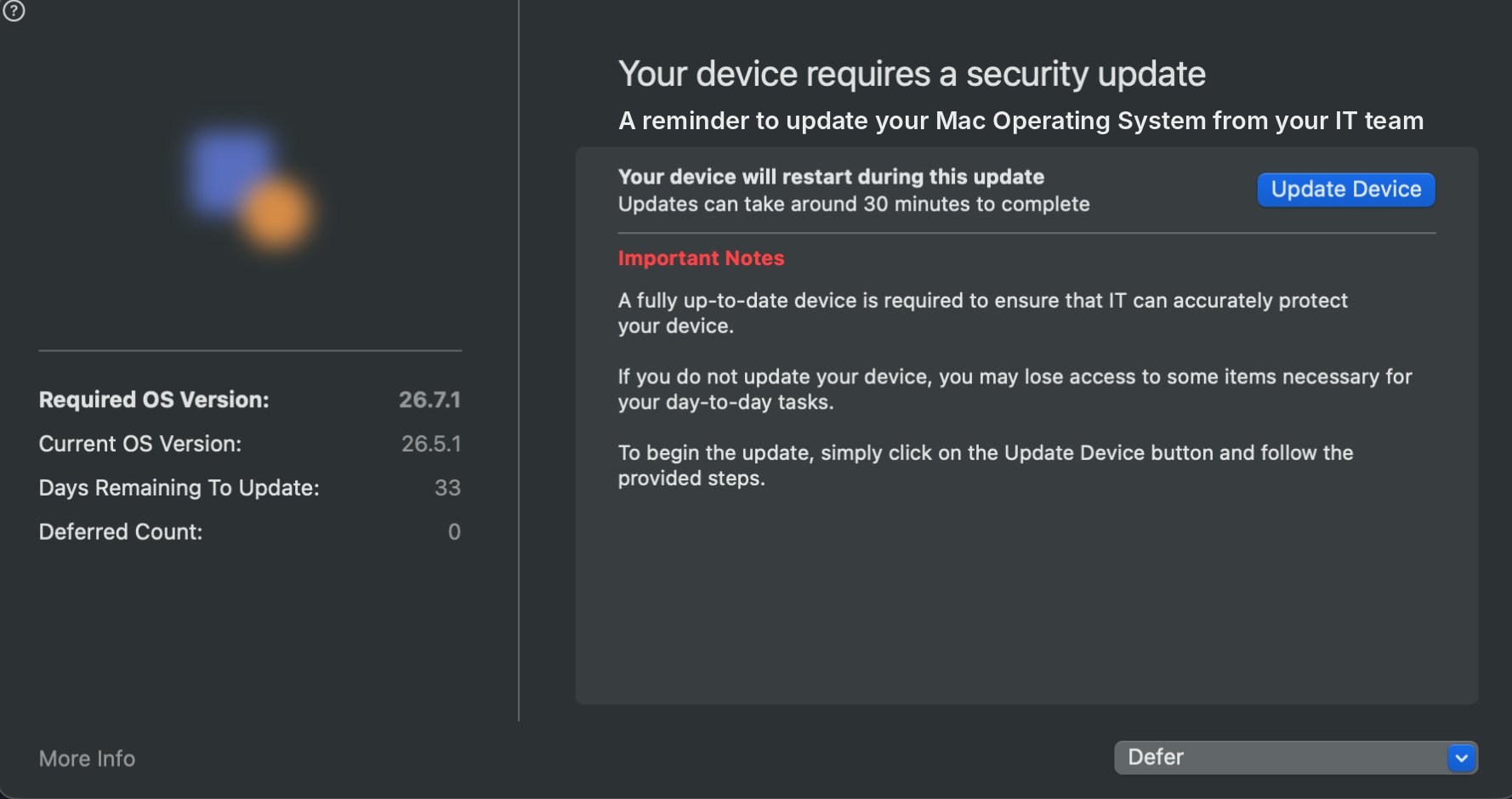
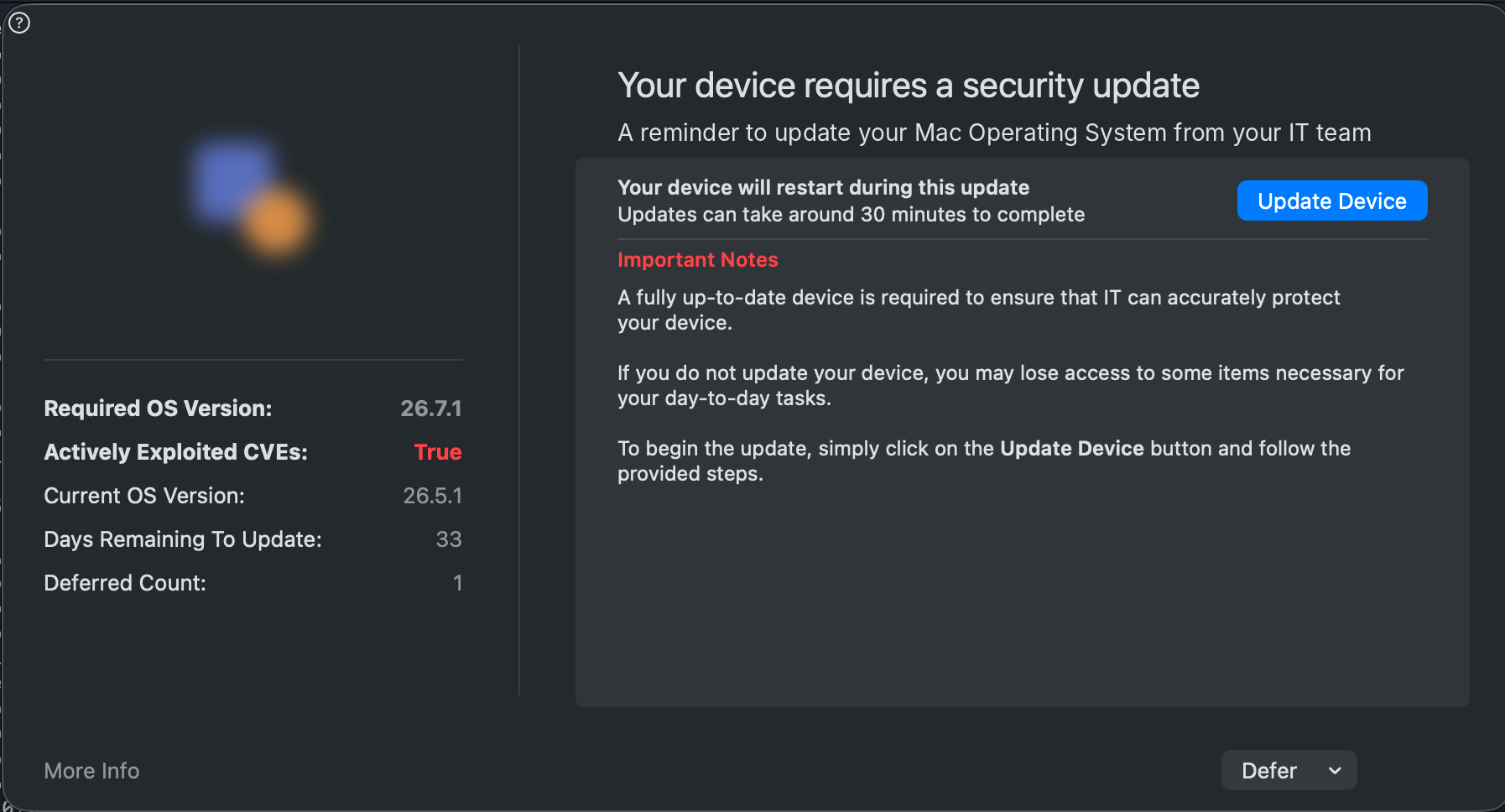
Users' deferrals survive the upgrade. Both versions store the "don't show until" time under the same key (deferRunUntil), and on our test Mac a deferral made in the 1.1.11 window kept 2.1.4 quiet until it expired, with the Deferred Count carried across. Nobody gets an extra prompt the moment the new version installs.
The Logger and Managed Login Items
The Suite installs a logging LaunchDaemon that runs Apple's own /usr/bin/log. Because the program is Apple's, it shows as "Unknown Developer" with no Team ID, so a Team ID rule cannot approve it:
Flags: [ legacy ] (0x1)
Identifier: 16.com.github.macadmins.Nudge.Logger
It was in the 1.x Suite too, so it was not new. We added a Label Prefix rule, com.github.macadmins.Nudge, with no Team ID (pinning it to T4SK8ZXCXG would stop it matching):

After the profile arrived, sudo launchctl kickstart -k system/com.github.macadmins.Nudge.Logger was enough to flip it to [ legacy, managed ], no restart needed. (Kickstarting Apple's own MDM client is blocked by SIP; a third-party daemon like this one is not.) A label prefix is weaker than a Team ID, because anything running as root could name itself to match, but a narrow prefix like this is a reasonable trade.
Per-Version Requirements, and Two Jamf Form Traps
We wanted Macs on 26 to move to 26.7.3, anything older to keep its existing target, and anyone already on 27 to stay current without pushing anyone else to 27. That needs three requirements:
targetedOSVersionsRule | Required version | Deadline |
|---|---|---|
27 | 27.2.1 | 30 November |
26 | 26.7.3 | 30 November |
default | 26.7.1 for anything older (a major upgrade, which installs the current 26 anyway) | 15 December |
We built it as a clone of the existing profile, named generically ("Nudge - Requirements") so the name survives future versions, scoped to one Mac, with that Mac excluded from the old profile. A Mac should only ever receive one Nudge profile. Two traps on the way:
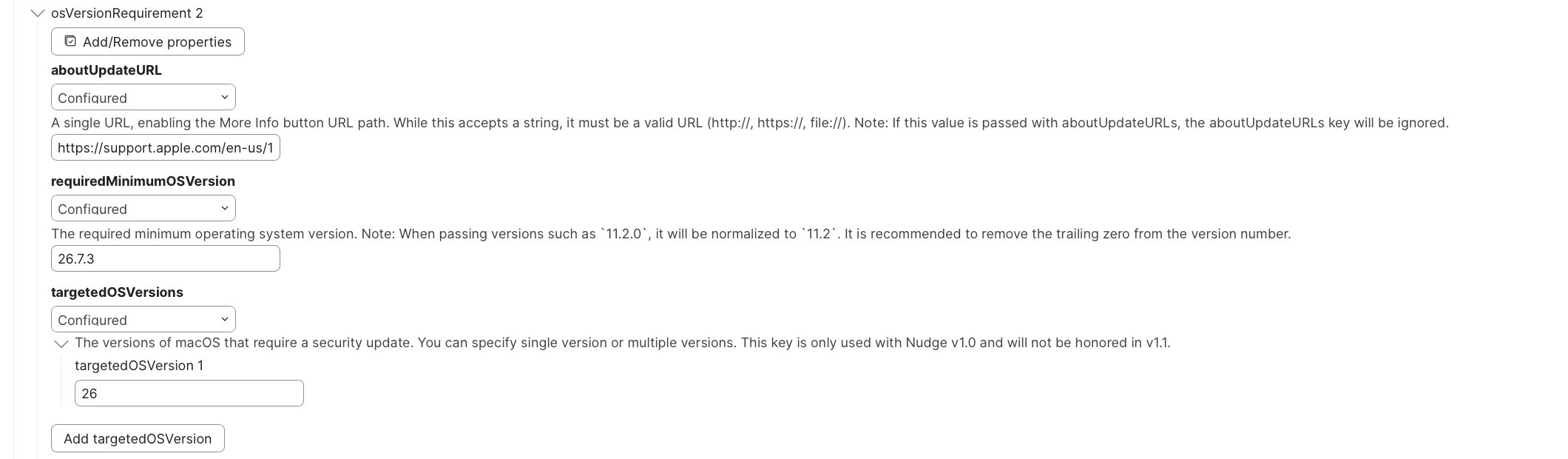
- The wrong key. Adding a second requirement in Jamf's Nudge form offered
targetedOSVersions, the Nudge 1.0 key ("only used with Nudge v1.0 and will not be honored in v1.1"), rather thantargetedOSVersionsRule. Nudge 2 ignores it, so that entry would have had no rule at all and become a second fallback. Use Add/Remove properties to swap them. - Empty sections on clone. The cloned profile came with two empty External Applications sections that blocked saving ("Field is required"). Remove them with the ×, leaving the section that holds your Nudge settings.
On the test Mac (26.7.1), Nudge picked the 26 rule over default: Required 26.7.3, 14 days remaining, and in the log "New Nudge event detected - resetting all deferral values". After updating, "Current operating system (26.7.3) is greater than or equal to required operating system (26.7.3)".
A correction to something I assumed along the way: I thought Nudge 1.1.11 might mix up a two-rule profile. Reading its code again, it handles a default plus a 26 rule correctly, because an explicit default stops the fallback logic. So you do not have to finish the 2.x rollout before switching requirements.
Two things that were easy to get wrong when reading the profile:
- A Mac on 27 matches neither the
26nor thedefaultrequirement in a useful way. Without its own rule it falls todefault, and any 27.x is "later than 26.7.1", so it is never prompted. A Mac on 27.0 could stay there indefinitely. The27rule fixes that without moving anyone onto 27. We tested it with-simulate-os-version 27.1: required 27.2.1, actively exploited CVEs true, 14 days. - The
defaultrequirement does not need to say 26.7.3. A Mac below 26 that upgrades gets the current 26, and if it somehow lands on an older 26.x, the26rule then catches it.
What "Update Device" Actually Shows
Nudge's button opens Software Update. On a Mac with a 7-day major deferral, long since passed, this is what the user gets:
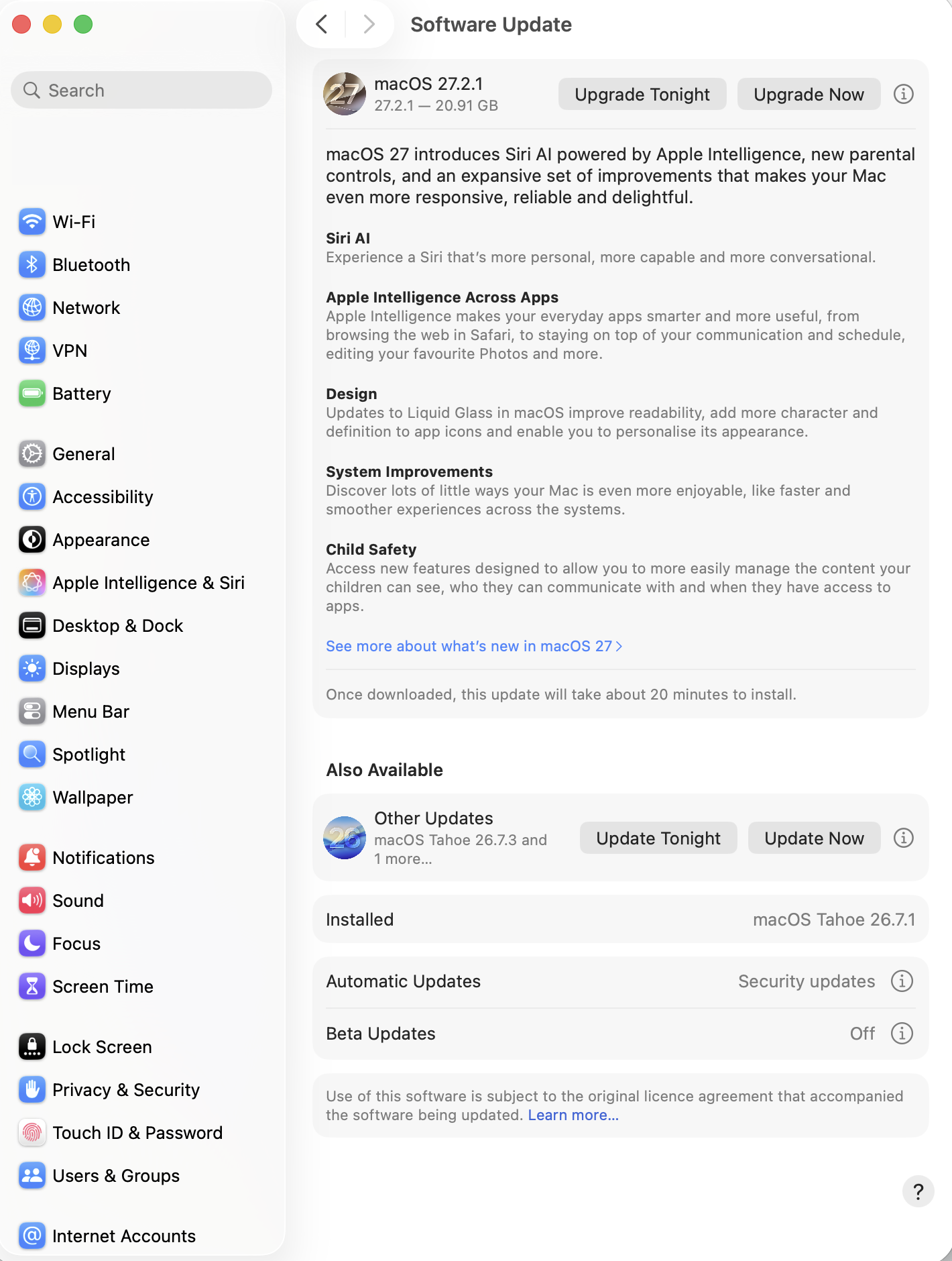
A user told to "update your Mac" will very likely press the first button they see. If you want people on 26.7.3 rather than 27, say so in the staff note and show them where it is. If you want 27 held back, the major deferral has to be raised (the Restrictions maximum is 90 days, and on Macs already on 27 Apple expects the newer declarative settings instead). We have not held 27 back fleet-wide; whether to hold older models back is a separate decision still to make.
Testing Without Waiting
Nudge 2 is deliberately patient, which makes testing slow. These switches are all in the 2.1.4 source:
# skip the random delay
/Applications/Utilities/Nudge.app/Contents/MacOS/Nudge -disable-random-delay &

# pretend the Mac is on an older macOS, and/or that it is a later date
/Applications/Utilities/Nudge.app/Contents/MacOS/Nudge -disable-random-delay -simulate-os-version 26.1 -simulate-date "2026-11-13T12:00:00Z" &

# clear a deferral the tester made earlier (run as the user, not sudo)
defaults delete com.github.macadmins.Nudge deferRunUntil
If Nudge launches and quits straight away, read the log rather than guessing: in our case it was a deferral we had clicked an hour earlier ("User has selected a deferral date … that is greater than the launch date"). -demo-mode also exists and shows sample values. A full reset of a test user's Nudge history is defaults delete com.github.macadmins.Nudge; only do that on test machines.
One thing that did not work: rebuilding an Apple silicon test Mac onto an older 26.x from a USB installer. It ended up on the current release, because Apple silicon only installs versions Apple is still signing. Use a VM (ours was a Parallels VM left switched off for months) or -simulate-os-version.
A Brand-New Mac
We erased a physical test Mac and let it enrol as a new starter's would. The configuration profile arrived through MDM before the Jamf agent had run any policies, so for a few minutes there were Nudge settings and no Nudge; harmless. Then the install policy, now carrying 2.1.4, installed the logos and Nudge together. And the grace period worked:
Evaluating grace periods - … creationDate: 2026-11-12 17:18:29 +0000, file age: 0 hours, gracePeriodLaunchDelay: 1 hours, gracePeriodInstallDelay: 23 hours
Recorded first grace-period event - installation deadline: 2026-12-15 00:00:01 +0000
gracePeriodPath (/private/var/db/.AppleSetupDone) within gracePeriodLaunchDelay (1) - File age is 0 hours
So Nudge stays silent for the first hour after setup, and only extends the actual deadline if it falls within 23 hours of setup. On our two long-established Macs the same check said "First grace-period event has no installation allowance", which is correct for Macs set up months ago.
Rolling Out to the Fleet
- Scope the update policy to All Computers. It runs once per computer, so the pilot Macs do not run it again and every other Mac installs 2.1.4 at its next check-in.
- Swap the package in the original install policy, so new Macs get 2.1.4 with the logos instead of the 2023 version.
- Watch it with two Smart Groups on the dashboard: Application Title is
Nudge.appand Application Version is (and is not)2.1.4.81863. They split the fleet cleanly, so a live progress bar costs nothing.
About half the fleet had updated within two hours and about 70% within three, with no failures and no user reports. The rest follow as they check in. If your "not updated" count barely moves, look at when those Macs last checked in: some of ours turned out to be records for Macs no longer in use, which is a separate clean-up.
Sorting the stragglers by last check-in made the list manageable. The morning after, most of what was left had not checked in for weeks or months (spare, stored or departed Macs) and a few were simply switched off. Only three had checked in since the rollout and still showed the old version.
"Failed" in a policy log does not always mean the install failed. On one of those three, the log read:
Error: Package was not successfully downloaded. -1009
The network connection was interrupted while downloading the package … Attempting to reconnect...
Successfully installed Nudge_Suite-2.1.4.81863.pkg.
Running Recon...
Locating software updates...
Exception Encountered: The timeout was reached before the command finished executing.
Software update command failed with an error: Software update timed out after 300 seconds..
Error running recon: Connection failure: "The Internet connection appears to be offline."
The download dropped, resumed and completed, and the package installed. It was the inventory update afterwards that failed, most likely because the laptop went to sleep just after midnight. Jamf marked the policy Failed and kept the old inventory, so the Mac stayed in the "not updated" group until its next successful inventory update. Read the details before re-running anything. If "Locating software updates" is slow on your Macs too (it was the slow step on our test VM as well), consider whether you need Jamf to collect available software updates in inventory at all.
Rollback
Not tested; these are the steps we would follow, from the quickest to the most involved. Only the first two are likely ever to be needed, and each is a single change in Jamf.
- Users unhappy with the deadline: do not roll back, move the date. Edit the deadlines in the requirements profile and save; prompts ease off straight away.
- Turn prompts off completely: empty the requirements profile's scope. With no requirement, Nudge exits silently on every Mac. Nothing is uninstalled; scope it again when ready.
- Go back to the old settings: empty the new profile's scope first, then scope the old profile to all computers again, the same order as the switch, so no Mac holds both.
- Nudge 2.x itself misbehaving: deploy the old 1.x Suite package with a policy to the affected Macs. Keep the
defaultrule as it is; it is correct for both versions. - Logos: put the old logos package back in the install policy and flush its logs. Keep the old package for a week or so after changing logos.
- Logger rule: remove the Label Prefix rule. The Logger goes back to
[ legacy ]and may produce a background-items notice.
The Switch
On 16 November, with the profile checked one last time:
- Staff note first, with a screenshot of Software Update with the 26.7.3 entry circled, and a line saying anyone already on 26.7.3 or 27 had nothing to do.
- Old profile: scope emptied, not edited. Its settings no longer mattered.
- New profile: scoped to All Computers.
- Checked on a Mac that all three requirements had arrived:
sudo defaults read "/Library/Managed Preferences/com.github.macadmins.Nudge" osVersionRequirements.
Removing the old profile before adding the new one leaves a gap of a minute or two where Macs have no Nudge settings at all. Nudge with no requirement simply exits, so nobody sees anything. The other order risks a Mac holding two Nudge profiles at once.
Updating the Logos the Same Way
While we were at it, the logos changed to the current wordmark: a two-tone version for light mode and the reversed (white) version for dark mode, both transparent, with the same filenames so the profile did not change. A few practical notes:
SRC=~/Downloads/NudgeLogos
WORK=~/nudgelogos
mkdir -p "$WORK/root/Library/Application Support/Nudge" && \
cp "$SRC/logoLight.png" "$SRC/logoDark.png" "$WORK/root/Library/Application Support/Nudge/" && \
xattr -cr "$WORK/root" && \
pkgbuild --root "$WORK/root" --identifier local.nudge.logos --version 2.0 --install-location / ~/Desktop/Nudge-Logos-2.0.pkg && \
rm -rf "$WORK" && \
pkgutil --payload-files ~/Desktop/Nudge-Logos-2.0.pkg
xattr -crmatters. Without it the package also carried._logoLight.pngand._logoDark.png, the downloaded files' extended attributes (most likely the quarantine flag).- Test locally first. Copy the two files into
/Library/Application Support/Nudge/and launch Nudge with-simulate-os-version. To check dark mode:osascript -e 'tell application "System Events" to tell appearance preferences to set dark mode to true'. - Re-running a once-per-computer policy. Rather than a second policy, we swapped the new logo package into the existing install policy (above the Nudge package) and flushed its logs: first for one Mac, then all. Every Mac runs it once more: new logos, plus a harmless reinstall of the same Nudge.
- Old packages are worth opening before you delete them. An older logos disk image of ours turned out to contain a 2023 JSON configuration as well (macOS 13.5 by August 2023). It was never read, because Nudge only looks for JSON at
/Library/Preferences/com.github.macadmins.Nudge.jsonand the profile takes precedence anyway, but it is the kind of thing you do not want deployed by accident.
What Happens Next
The deadline for Macs on 26 and 27 is 30 November; this guide will be updated with how it went. A second part will cover macOS 27 itself: Intel-only apps before Rosetta's cut-back in macOS 28, VPN clients, and when to require 27.x.
What Is Documented, Observed, or Inferred
First-hand, 12 November 2026: the starting configuration; the rule change and its unchanged result on 1.1.11; the package signature; the pilot results, logos, background-item flags and Logger fix; the random delay, SOFA line, grace-period and deferral log lines quoted above; the two Jamf form traps; Software Update offering 27.2.1 above 26.7.3; the new-Mac grace behaviour; the rollout percentages; the USB rollback attempt ending on the current release.
From Nudge's source (read, not separately tested): 1.1.11's fallback behaviour for unmatched rules; 2.x's stricter matching; the default values for randomDelay, utilizeSOFAFeed and the grace periods; the test switches; what the Suite package installs.
Inferred: that upgrading to 2.x with a 14 rule would have silenced Nudge on other versions (fixed before it could happen); that Apple's signing is why the USB rebuild landed on the current release.
Also first-hand, 16 November: the switch, the three requirements arriving on a Mac, the 27 rule tested with -simulate-os-version, the logo package and log flush, and the contents of the old disk image.
Not tested: the rollback steps. Not yet known: how the 30 November deadline goes.
Closing Thoughts
Nothing was broken, and that is exactly why this was worth doing before macOS 27 rather than after. A tool that keeps working is easy to leave alone, but the one setting we would have missed would have turned it off silently on the next upgrade. Read the rule, check the package, pilot on one Mac, and let the logs tell you what changed.
← All guides