Eight eMudhra intermediate CAs were found to have recoverable private keys. Browsers blocked them within hours, Apple and Microsoft within days, but that does not mean every machine you manage is covered. This is what I did on the day across Intune-managed Windows, two Active Directory domains and a Jamf-managed Mac fleet: check what was already protected, close the gaps, prove the result and prove the rollback.
Scope note. Everything in the deployment sections was done and tested on 22 October 2026. The incident timeline is from Google's and Mozilla's public records and eMudhra's own statement; where they disagree I say so. The remediation pack is the one I used, with internal names removed.
The vendors have caught up. Microsoft's plan was to start removing the remaining eMudhra roots from Windows, Edge and WebView2 on 16 November, through the automatic root updates (MSRC, last revised 12 November). A day later I have seen no reports of delay or breakage, but I have not yet checked my own machines for the change. Chrome's and Firefox's cut-off for new G1 certificates passed the same night. Apple's date for G1 is 30 November, per eMudhra. eMudhra filed its full incident report on Mozilla bug 2083449 around 10 November. It adds no revocations beyond the sixteen and the eight covered above.
What that means for this guide. Once those changes land, the block of sixteen is belt and braces rather than the only line of defence. On Windows, Group Policy and Intune hold it whatever a machine's update state. On the Mac side, the cert.pem policy now runs daily, only on Macs below Apple's fixed versions, so it retires itself as they update. I am leaving the block in place until the fleet is confirmed on patched versions, then removing it with the rollback already tested above. This is the last planned update; the guide stays up as a record of what was done on the day.
Eight more revoked. On 7 November eMudhra revoked eight more intermediates, the RSA versions of the same CAs: EM DV, OV and EV TLS CA - G2B and G2C (issued by emSign Root TLS CA - G1), and EM OV CS CA - G2B and G2C (issued by emSign Root CS CA - G2). The reason given is cessationOfOperation. eMudhra listed them on 10 November in its incident report (Mozilla bug 2083449, comment 82); on 19 October it had said the RSA keys were not affected. These keys were not weakened like the first eight. Their private keys passed through the transfer script's memory during the HSM move, so eMudhra cannot show they stayed confidential. It reports no misuse, and the report lists no Sectigo cross-signs for them.
I have not added them to the block; it stays at sixteen. Their roots are going anyway on the platforms this guide covers. Microsoft removes the remaining eMudhra roots, including emSign Root TLS CA - G1 and emSign Root CA - G1, from Windows, Edge and WebView2 from 16 November, through the same automatic root updates the baseline checks (MC1529467, as reproduced here; I have not seen the Message Center original). On macOS, 27.2.1, 26.7.3 and 15.8.3 remove emSign Root CA - G1 and four other roots from /etc/ssl/cert.pem (Apple 149555), and eMudhra's notice gives 30 November for Apple ending trust in G1 (eMudhra; Apple's own page does not give that date). Chrome and Firefox are different: they keep G1 but stop trusting G1 certificates issued after 16 November, so in those browsers these eight rely on revocation. A Windows machine without Microsoft's automatic root updates will not get the 16 November change either; the baseline finds those.
macOS has fixed cert.pem. The same macOS updates also remove AAA Certificate Services and emSign ECC Root CA - G3, the two roots the Jamf script removes, and block the twelve TLS certificates in curl, git and the other command-line tools. On those versions the script should find nothing to remove and report Already clean (inferred; I have not yet seen it run on one). Keep the policy for Macs not yet updated. Apple also says to delete any cert.pem backup after updating and never restore it; see the warning in the rollback section.
Correction: the 5 November update gave Homebrew's fixed ca-certificates as 2026-10-20. That is the date of curl's bundle. The fixed Homebrew formula is 2026-09-25_1 (homebrew-core PR 319674). The section on what this does not cover now has vendor links for bundled trust stores, Linux and containers.
Policy frequency, 13 November: the Jamf policy is set to Ongoing, so it runs at every check-in. That was right during the incident (it re-patched Macs that macOS reverted and a test Mac that had been switched off for months, within minutes of it checking in), but on one Mac it logged a run every few minutes all day. With Apple's own fix in macOS 26.7.3 and 27.2.1, we changed it to Once every day and scoped it to Macs still below those versions, so it fades out on its own.
Results two weeks on. Intune: every Windows device that ran the script succeeded, with no failures. Jamf: about three quarters of Macs (76%) report Patched, about a fifth (19%) had not reported since the attribute was created (mostly inactive machines), and the remaining 4% showed Exposed, all of them on macOS 27.2: that update put Apple's original /etc/ssl/cert.pem back, undoing the fix. Later policy runs on those Macs report "Already clean", so the Ongoing policy has re-patched them; the attribute catches up at the next inventory. That is inferred from the logs, not watched happening, but it is exactly the case the Ongoing frequency was for. To see when a Mac was last patched, run ls -l /etc/ssl/cert.pem: the script writes a new file, so its date is the patch time. Do not use the backup's date; the script copies with cp -p, which keeps the original file's date.
Microsoft went further than the block: on 26 October it released out-of-band updates removing seven certificates (six eMudhra G3 roots and an AAA Certificate Services cross-sign) from the Windows trust list, and the same seven from Edge on 27 October (MSRC). Those updates are for devices that do not receive the automatic lists. Your own block of the sixteen still works whatever a machine's update state.
Apple says it has blocked the twelve TLS certificates since 19 October and emSign ECC Root CA - G3 since 23 October, and that /etc/ssl/cert.pem will be fixed in a future macOS update (Apple 149555). macOS 27.2 did not fix it, as above. Keep the Jamf policy until Apple's release notes say the file has been updated. (Since fixed in 27.2.1, 26.7.3 and 15.8.3: see the 12 November update.)
Elsewhere: Chrome and Mozilla have removed emSign ECC Root CA - G3. Some Java builds have also removed emSign Root CA - G1, which Mozilla is keeping, so the root stores now disagree on that one. eMudhra has announced it is leaving the global TLS certificate business (eMudhra, 22 October). Fixed ca-certificates packages are out for RHEL and its rebuilds (AlmaLinux and Rocky ALSA/RLSA-2026:88455, 88459, 88550), Debian (DSA-6572-1) and Ubuntu (USN-8944); on Debian and Ubuntu the Java keystore is not refreshed by the package. Homebrew's ca-certificates 2026-09-25_1 removes both roots (corrected 12 November; I first gave 2026-10-20). Cisco's advisory (cisco-sa-emudhra-info) lists ASA, Secure Firewall Threat Defense and FMC as impacted with remediation steps, and Meraki devices as still under investigation. UniFi OS 5.1.34 lists the revoked certificates in its release notes, with some users reporting lost connectivity after updating, so stage it.
One more reason not to wait: over 107,000 certificates signed with six of the compromised keys have since been logged to Certificate Transparency, mostly proof-of-concept certificates for google.com issued through the AAA cross-signs (Mozilla bug 2083449, comment 44). Certificate Transparency on its own is no longer any protection here; a blocklist or a removed root is.
No malicious use has been reported (Cisco Talos, 21 October; Cisco PSIRT, 30 October).
What Happened, in One Paragraph
Eight intermediate CAs created at an eMudhra key ceremony on 30 April 2025 had private keys that could be recovered. Six issue TLS certificates (EM DV, OV and EV TLS CA, each in G3B and G3C) and two issue code-signing certificates (EM OV CS CA G3B and G3C). Each key exists as two certificates: one issued by eMudhra's own emSign root, and one cross-signed by Sectigo's legacy root, AAA Certificate Services. That is sixteen certificates to block, not eight. Chrome pushed a CRLSet block on 17 October; Mozilla distrusted them through OneCRL the same evening. Mozilla's record and the public revocation data put eMudhra's revocation on 18 October between 09:24 and 09:38 UTC (eMudhra's own statement says the 19th). Sectigo revoked its eight cross-signs on 19 October. Apple's and Microsoft's blocks are reported for 19 and 20 October; I found no vendor statement for either, but I saw both working on my own machines, below. Chrome and Mozilla are also removing the emSign ECC Root CA - G3 entirely. eMudhra states none of the eight issued an end-entity certificate. That is their claim, and it does not matter much: anyone with the keys can issue their own.
Block 16 Intermediates, Not the Root
The tempting shortcut is to distrust AAA Certificate Services, which takes out all eight cross-signs in one line. On Windows I did not, because AAA still anchors legitimate Sectigo chains: Sectigo's current roots are cross-signed by it, and some code signing and timestamping still reaches it. Windows can block individual certificates, so the narrow fix is available, and it is what Microsoft itself shipped.
Root removal is the right tool where a trust store cannot block individual certificates: Linux CA bundles, Java's cacerts, and the command-line bundle on macOS. That is why the macOS section below removes two roots from one file while Windows blocks sixteen certificates and leaves the roots alone.
The Certificates and the Pack
Get the sixteen certificates from a source independent of whoever tells you to block them, and check the fingerprints. I built mine from the published list of impacted intermediates and checked that the individual files, the bundled .p7b, the script payload and the Intune rows all agree. These are the SHA-1 thumbprints Windows shows:
| Intermediate | Issued by | SHA-1 thumbprint |
|---|---|---|
| EM DV TLS CA - G3B | emSign Root TLS CA - G3 | A99B289464F3B44343270A7A1E910F02370483FE |
| EM DV TLS CA - G3B | AAA Certificate Services | 1396BE1372BC93DFA2A433CA964DBA91548A6E57 |
| EM OV TLS CA - G3B | emSign Root TLS CA - G3 | 5F014E0DB3BB8F950E0598AB280846D383FC57BE |
| EM OV TLS CA - G3B | AAA Certificate Services | 5DFA19197D1C1CF629AF7C0CD865543C5050227C |
| EM EV TLS CA - G3B | emSign Root TLS CA - G3 | F33ACD1F5D31AA81AC18C72C928446226D3D5914 |
| EM EV TLS CA - G3B | AAA Certificate Services | 19069BD6533BFF93FB67C71FB3376B4EA7402C3B |
| EM DV TLS CA - G3C | emSign Root TLS CA - G3 | 8AD23BC78845D6FAAE1D534BAC89F0E36BA55A11 |
| EM DV TLS CA - G3C | AAA Certificate Services | 4B0944C14F8C2CCBA4E4F32104AD920FA15EE331 |
| EM OV TLS CA - G3C | emSign Root TLS CA - G3 | 7FCC31AAB874CE6C8EE8584F54CFD08646B54117 |
| EM OV TLS CA - G3C | AAA Certificate Services | 305FC1E253DCAB71B95D4995DAE3CB09D562F22A |
| EM EV TLS CA - G3C | emSign Root TLS CA - G3 | C988F3D0CC1629FFC43165D6464C9B6EF73D6E48 |
| EM EV TLS CA - G3C | AAA Certificate Services | 8588708E875A1F8AA83524F3559080F7E17068C7 |
| EM OV CS CA - G3B | emSign Root CS CA - G3 | D33195A244046A3263FB5E0E83C6803A5B2E7BC3 |
| EM OV CS CA - G3B | AAA Certificate Services | EE26D7AE3CC71718F6E07D7D0095076F0C158F63 |
| EM OV CS CA - G3C | emSign Root CS CA - G3 | 1F4A5D178F8B6A8EF0F6784155BD5FEA91158B12 |
| EM OV CS CA - G3C | AAA Certificate Services | 7FDE64753A957B98F172FD2AB0D922551909C7BA |
guideonce-emudhra-remediation-pack.zip (SHA-256 f9da828ccd0c812c6b77ead7fe8a43a68f382c6e9ab3fbed51b96a6dddf5c51d): the .p7b, the sixteen certificates, a manifest with SHA-1 and SHA-256, the Intune import, check and rollback scripts, sixteen Intune OMA-URI rows as an alternative (I used the script, not the rows, so the rows are untested), and the Jamf script and Extension Attribute. Check the fingerprints yourself before you use any of it.
Baseline First: What Is Already Protected
Before changing anything, find out what you already have. On an Intune-managed Windows laptop, in Windows PowerShell 5.1:
reg query "HKLM\SOFTWARE\Policies\Microsoft\SystemCertificates\AuthRoot"
certutil -verifyctl Disallowed | findstr /i "lastsynctime"
Invoke-WebRequest -UseBasicParsing https://dv-g3b-emudhra.we-have-a-problem.com/
Invoke-WebRequest -UseBasicParsing https://dv-g3b-aaa-emudhra.we-have-a-problem.com/
The first command found no policy key, so nothing was switching off Windows' automatic certificate updates. (The two values that can, DisableRootAutoUpdate and EnableDisallowedCertAutoUpdate, have opposite polarity: EnableDisallowedCertAutoUpdate = 0 is the one that stops Microsoft's block arriving.) The untrusted list had synced that morning. Both test hosts, one served through the emSign-issued chain and one through the AAA cross-sign, were refused: Could not establish trust relationship for the SSL/TLS secure channel. The test hosts are run by the researcher's disclosure site, not by eMudhra; a trust error means protected.
So the machine was already protected before I deployed anything. The useful detail is where that protection lives:
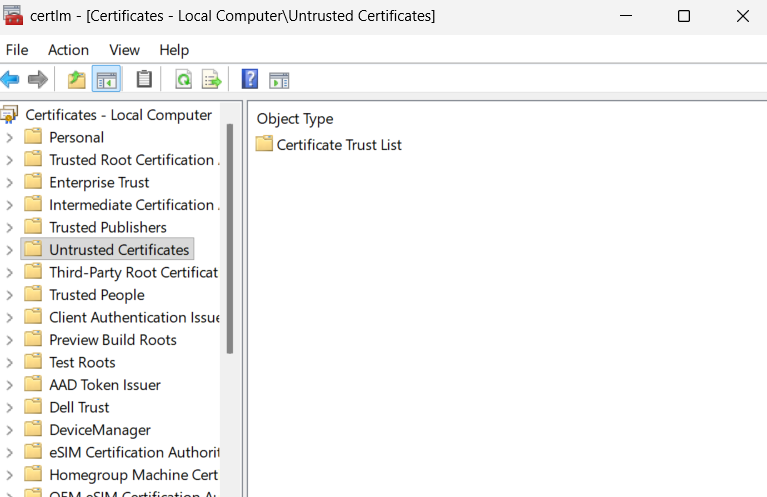
That matters for verification. My check script, which looks for the sixteen certificates in the store, reported FAIL 0/16 on a machine that was demonstrably protected. A check like this measures your block, not overall protection. Say so wherever you hand the script to colleagues, or someone will read a FAIL as "exposed".
I ran the same lastsynctime check on a domain controller in each of my two domains. Both had synced that day, so in my estate Microsoft's block was already reaching the DCs too. If yours are firewalled from Windows Update, that check is how you find out, and your own block is then the only protection they have.
Why deploy anything, then? Because Microsoft's block depends on a setting someone can turn off and on a network path someone can close, and you cannot see either from the console. Putting the sixteen certificates in the store yourself guarantees the block on every managed machine, whatever its update state, and it is reversible.
Windows: Intune
I used a platform script rather than sixteen custom-profile rows, because the script can verify itself and report failure. It adds the sixteen certificates to Local Computer → Untrusted Certificates, refuses to run if its payload is not exactly the expected sixteen, then checks all sixteen are present and exits with an error if not, so failures show in Intune.
- Create an assigned security group containing one test device.
- Devices → Scripts and remediations → Platform scripts → Add → Windows 10 and later. Upload
Import-eMudhra16-Untrusted.ps1. Run using logged-on credentials: No. Enforce signature check: No. 64-bit PowerShell: Yes. - Assign to the test group. On the device, Sync from Access work or school, or restart the Intune Management Extension service.
- Check:
powershell -ExecutionPolicy Bypass -File .\Check-eMudhra16.ps1.
Result on the test laptop: PASS 16/16, sixteen certificates now listed under Untrusted Certificates in certlm.msc, both test hosts still refused, and Success in the script's device status.
To widen it, edit the assignment. One portal quirk: Add all devices stays greyed out until you remove the existing group, and once All devices is added, Add groups greys out instead. Remove the pilot group first; if you lose your nerve, Cancel before saving and nothing changes. All devices means Intune-enrolled devices, and a Windows platform script only runs on Windows.
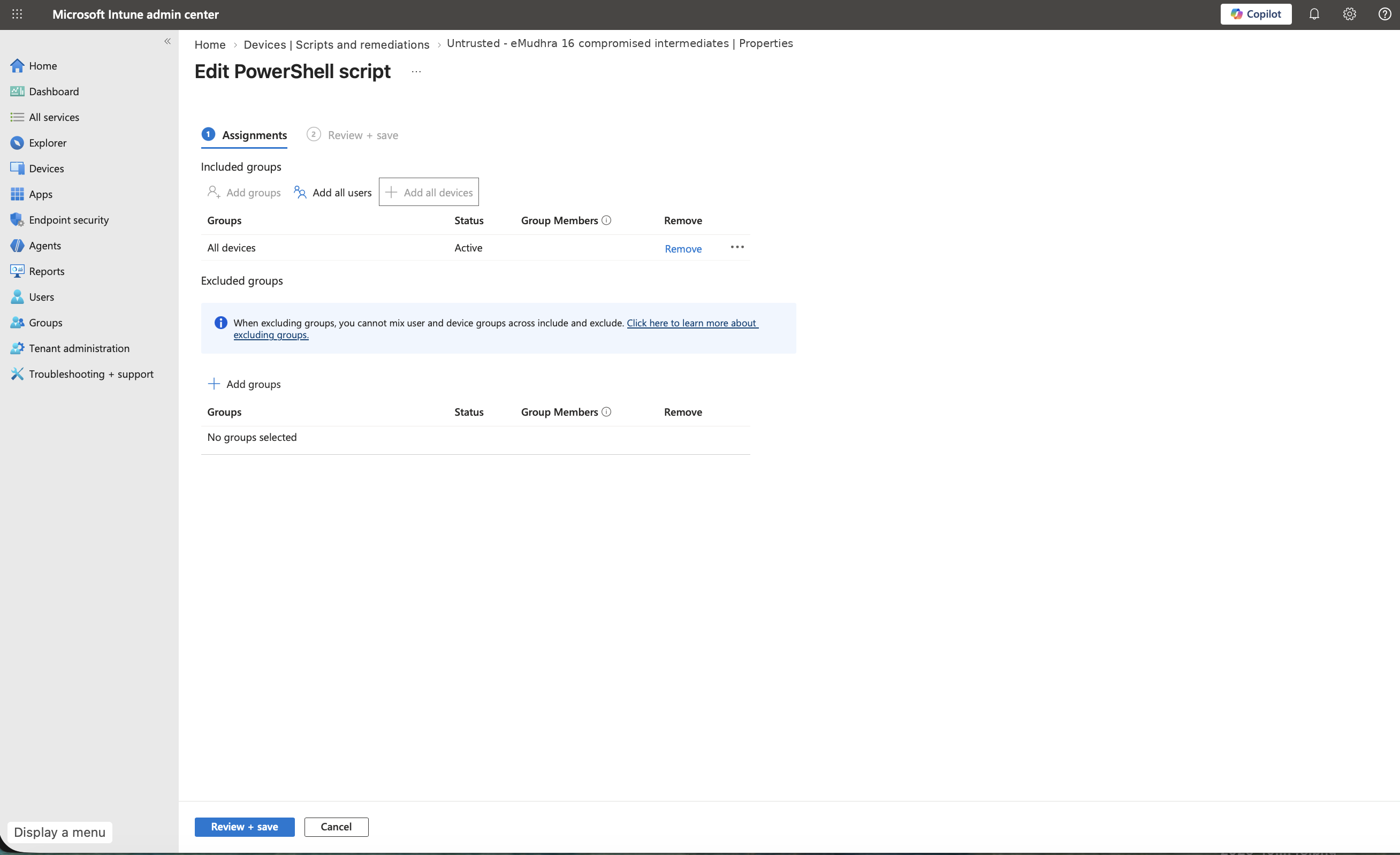
One limit I cannot get round on this laptop: it was protected before and after, so the test hosts prove the script installed cleanly and broke nothing, not that the script alone stops the compromised chains. That would need a machine with Microsoft's updates switched off.
Windows: Group Policy
For domain-joined machines, one GPO per domain, using the .p7b so all sixteen go in with one import.
- In GPMC, create a GPO and set GPO Status → User Configuration Settings Disabled.
- Edit it: Computer Configuration → Policies → Windows Settings → Security Settings → Public Key Policies → Untrusted Certificates. Right-click, Import, set the file type to All Files, choose the
.p7b, and leave the store as Untrusted Certificates. - Before linking anything, check the status bar reads Untrusted Certificates store contains 16 certificates and that you are in Untrusted Certificates, not Trusted Root. Importing into the wrong node is the one way this change could do harm, and it is visible here.
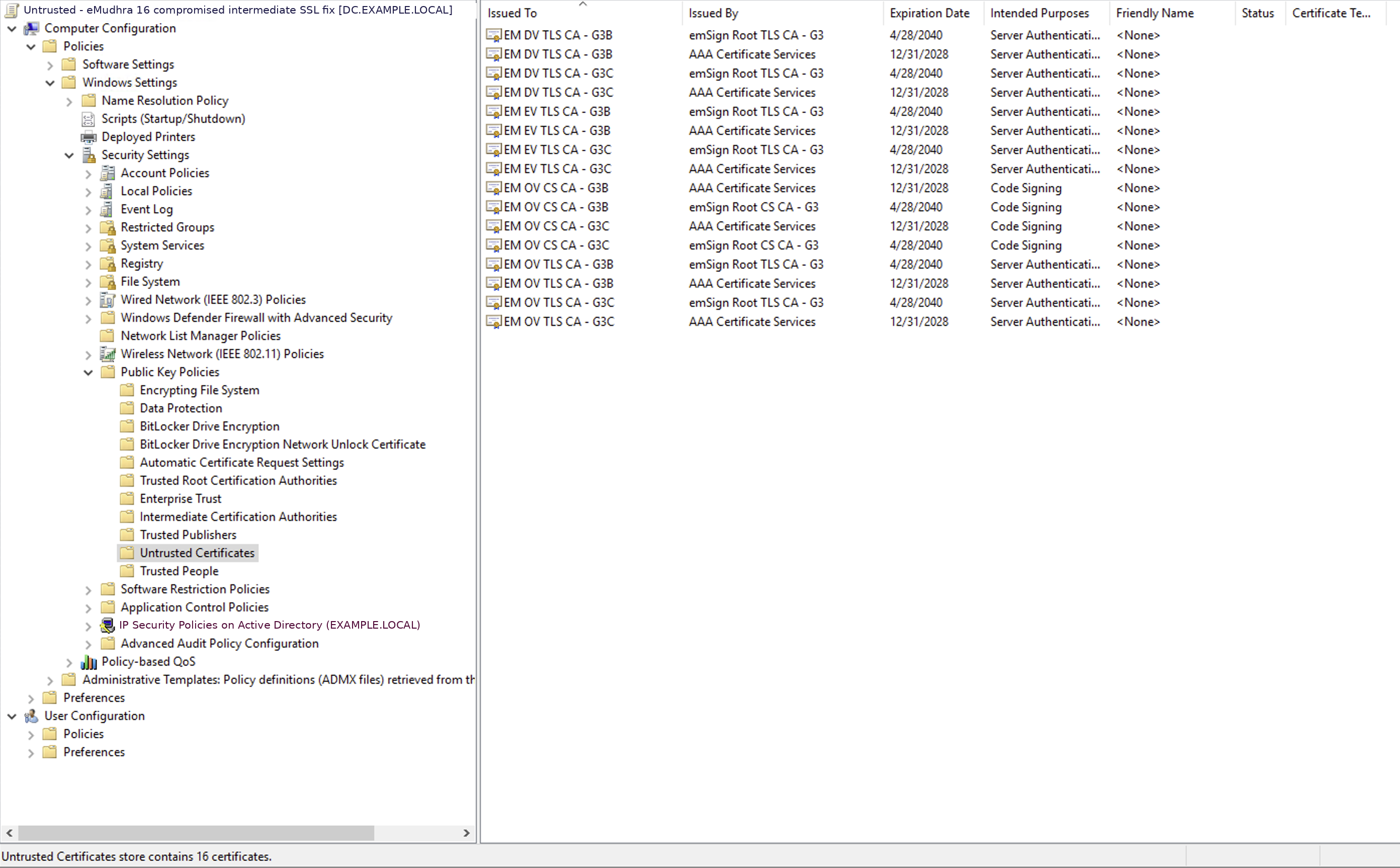
I linked it to a test OU first, on a member server that was domain-joined but not Intune-enrolled, so anything that appeared came from Group Policy. Group Policy keeps the certificates it delivers in its own registry location, which gives a check independent of the script:
gpupdate /force
gpresult /r /scope computer | findstr /i "eMudhra"
(Get-ChildItem "HKLM:\SOFTWARE\Policies\Microsoft\SystemCertificates\Disallowed\Certificates").Count
powershell -ExecutionPolicy Bypass -File .\Check-eMudhra16.ps1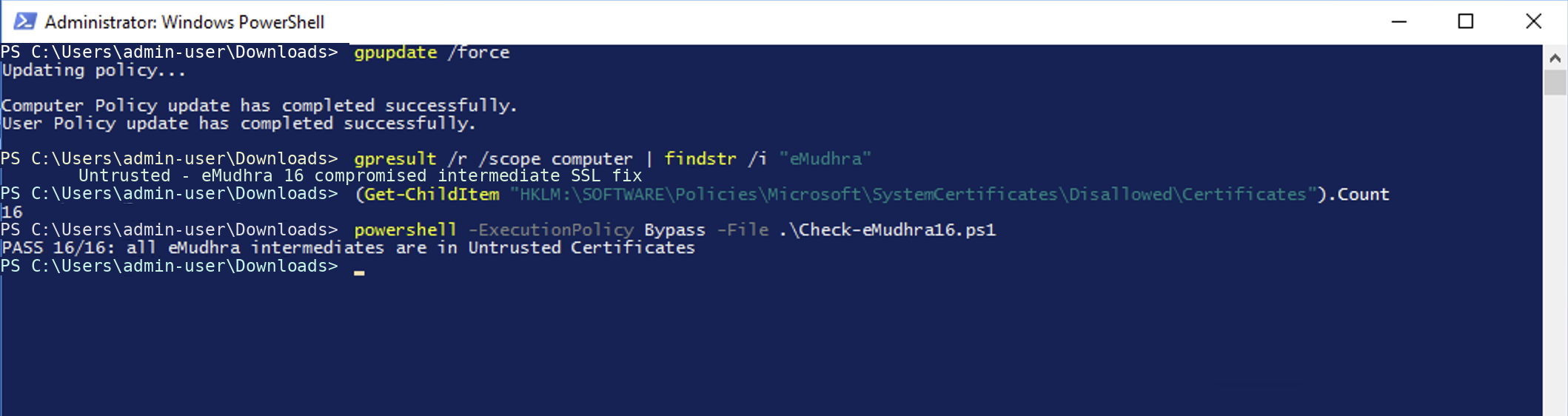
Before the link that count was 0. The key existed but was empty, which is why I count rather than test whether the key exists. After it was 16. And the check script passed, which answered a question I had not been sure of: it sees GPO-delivered certificates as well as script-delivered ones, so one check works for both routes.
Then I linked it at the domain root. That covers every computer, including the domain controllers and any machines sitting in the default Computers container, which cannot take a GPO link of its own. I was comfortable putting the DCs in the first wave: nothing a DC legitimately does should chain through these sixteen certificates, Microsoft was already blocking the same certificates on my DCs, the rollback was proven (below), and DCs pick up computer policy every five minutes, so a DC was showing the GPO applied and PASS 16/16 within minutes. If any OU blocks inheritance, those machines will not get a root-linked GPO; check for them.
My two domains have no trust between them, so GPMC cannot paste a GPO from one to the other. I rebuilt it in the second domain from the same .p7b, which takes two minutes and leaves no doubt about what is in it, checked the computer version showed matching non-zero AD and SYSVOL numbers, linked it at that root, and confirmed PASS 16/16 on a DC there.
For anyone with older servers: the GPO and the check script behaved the same on Windows Server 2012 R2 (FAIL 0/16 before, the GPO listed and PASS 16/16 after gpupdate) as on Windows Server 2016.
macOS: the Gap Apple's Block Leaves
On a Mac on macOS 26.7.1, before changing anything:
curl -sS https://dv-g3b-emudhra.we-have-a-problem.com/ -o /dev/null && echo "emSign path: TRUSTED (exposed)"
curl -sS https://dv-g3b-aaa-emudhra.we-have-a-problem.com/ -o /dev/null && echo "AAA path: TRUSTED (exposed)"
Both printed TRUSTED (exposed). At the same moment, Safari refused the same host:
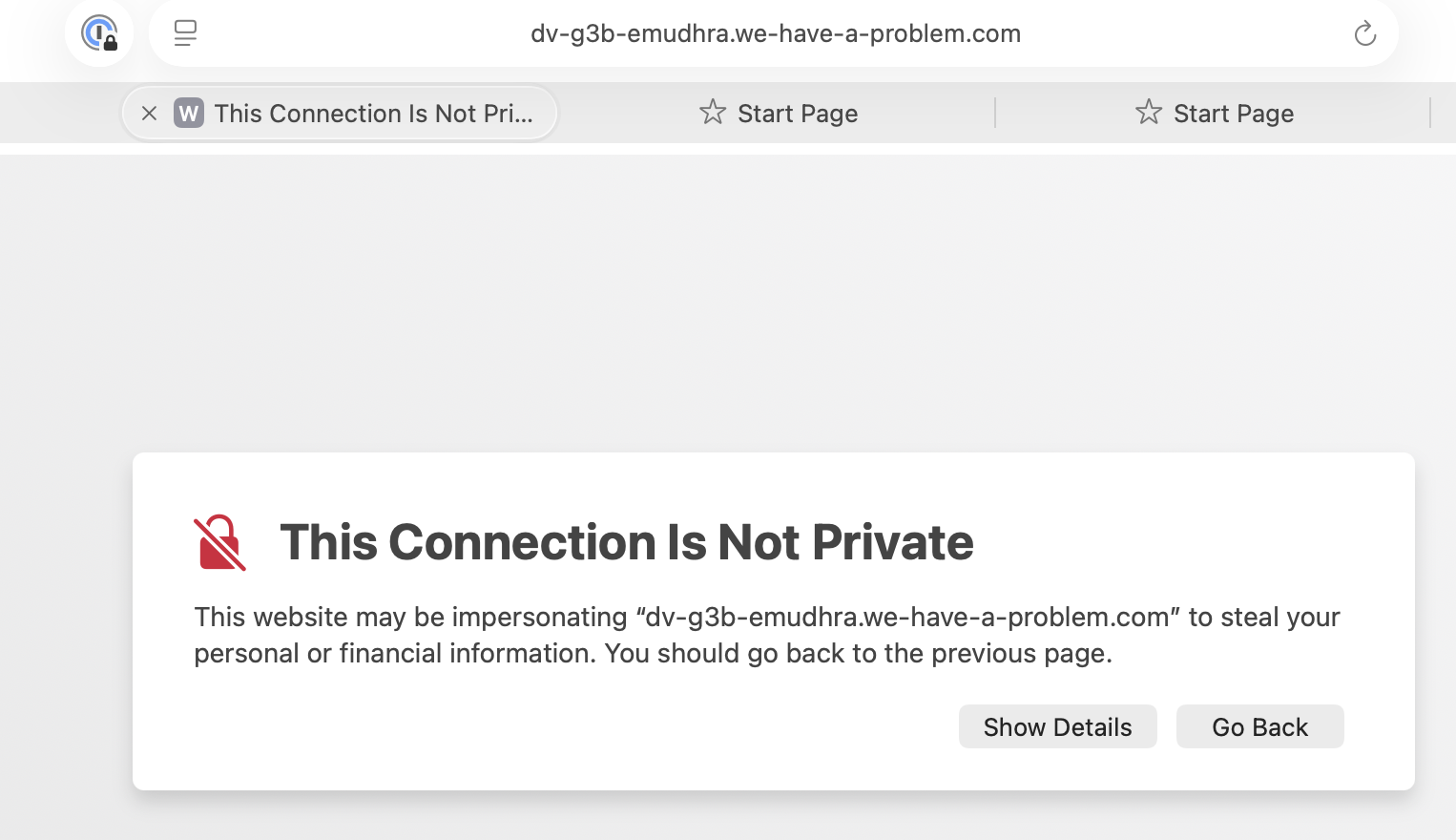
Apple's block covers apps that use the system trust evaluation, such as Safari and Mail. Apple's built-in curl, and with it git, python3, openssl, perl and ruby, read /etc/ssl/cert.pem instead, which Apple's block does not touch. On my Mac that file held 128 certificates, including both AAA Certificate Services and emSign ECC Root CA - G3.
That file is a flat bundle; it cannot express "block this intermediate". So here root removal is the right tool. The Jamf script removes those two roots from /etc/ssl/cert.pem. It backs the file up first, refuses to install a result with fewer than fifty certificates, and does nothing on a Mac that is already clean, so it can run at every check-in and catch any Mac where a macOS update restores the file.
- Settings → Computer management → Scripts: add
jamf-fix-macos-cert-pem.sh. - Computers → Policies: new policy, trigger Recurring Check-in, frequency Ongoing, the script, scoped to one Mac.
- On that Mac:
sudo jamf policy.
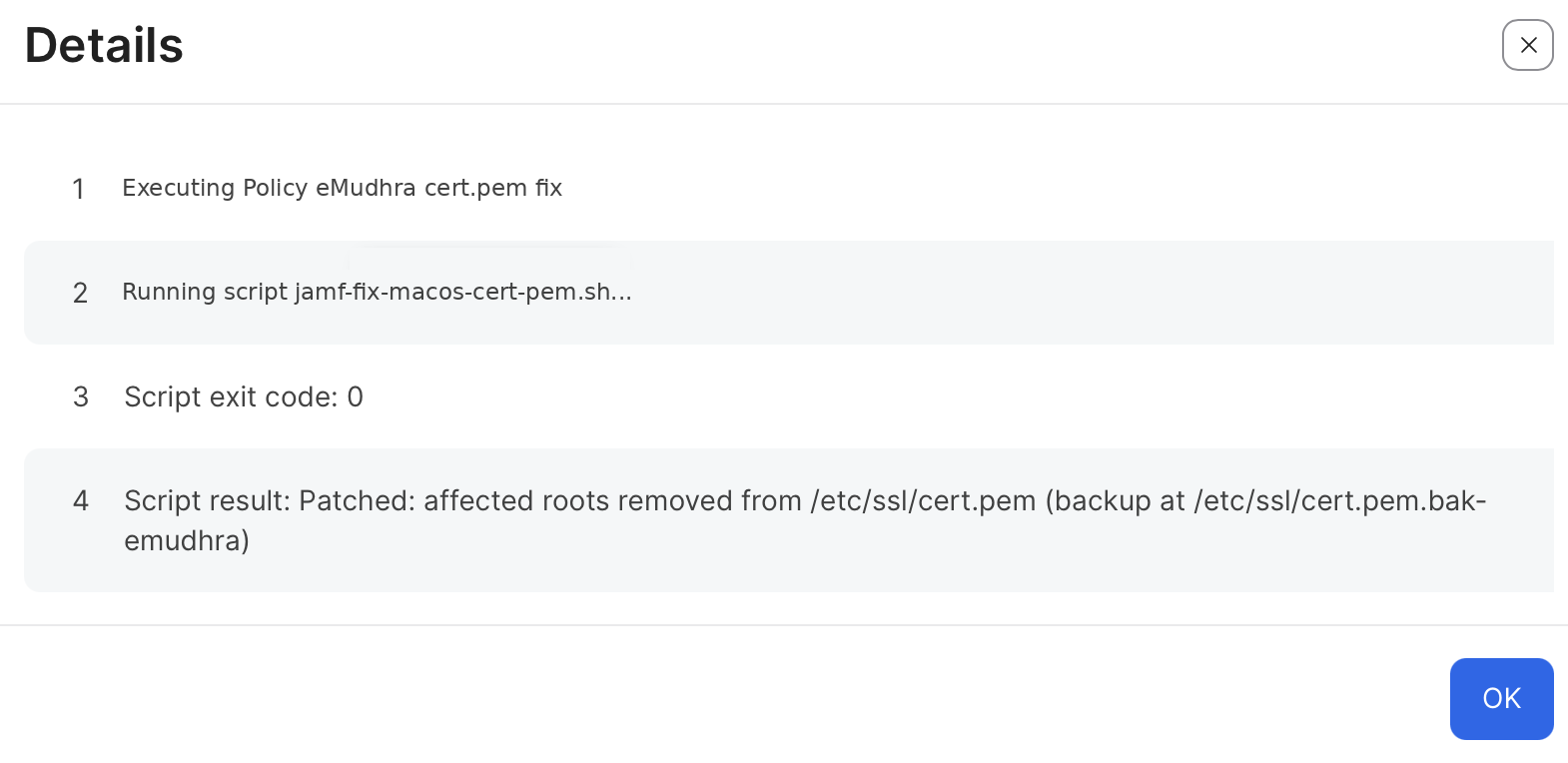
After: both curl tests failed with curl: (60) SSL certificate problem: unable to get local issuer certificate, the file held 126 certificates, and github.com and sectigo.com still worked over curl. Sectigo's own site is the deliberate check that removing AAA from this one file did not break Sectigo's current chains. That is two sites, not an exhaustive test. Jamf itself carried on working afterwards: the Mac kept checking in and ran inventory normally, which is how the Extension Attribute below reported Patched.
One thing I nearly deployed and should not have. My plan had a Jamf Extension Attribute that reported whether each Mac still trusted the emSign roots, with a Smart Group of failures. On a fully updated Mac, security verify-cert against emSign ECC Root CA - G3 returned success: Apple blocked the intermediates, not the root. That attribute would have flagged every Mac in the fleet, patched or not, and updating macOS would have moved none of them. I replaced it with one that reports the thing I can act on, whether cert.pem still holds the two roots (jamf-ea-cert-pem-status.sh in the pack, Patched or Exposed), plus a Smart Group of Exposed Macs. Then I widened the policy to all computers. I tested on macOS 26.7.1 only.
Verifying Across the Estate
- Intune: the script's Device status. Success means all sixteen are present; Failed means its own check found fewer, and it retries.
- GPO:
gpresultplus the policy store count on a sample of machines in each domain, including a DC. - Any Windows machine: the check script. PASS means your block is there. FAIL means it is not, which is not the same as unprotected.
- Jamf: a saved Advanced Computer Search with no criteria, displaying computer name, OS version, last inventory update and the cert.pem status attribute. That gives Patched, Exposed or blank for every Mac, which is a real report; a search with criteria only ever shows one state. Blank means the Mac has not run inventory since the attribute was created. The policy runs at check-in but the attribute only updates at inventory, so the report lags; a one-off policy with Update Inventory, run once per computer, speeds it up. Do not add inventory to the Ongoing policy.
- Spot test anywhere: the two test hosts. A trust or certificate error means protected.
Rollback and Exclusions
Prove first, then exclude, then roll back. Usually you can show a complaint is unrelated without undoing anything.
Is it us at all?
On Windows, the block only affects chains through one of the sixteen certificates. This prints a site's chain without changing anything:
$h = 'example.com'
$t = New-Object Net.Sockets.TcpClient($h, 443)
$s = New-Object Net.Security.SslStream($t.GetStream(), $false, { param($a,$c,$ch,$e) $global:ch=$ch; $global:err=$e; $true })
$s.AuthenticateAsClient($h)
$global:ch.ChainElements | ForEach-Object { $_.Certificate.Subject }
"Errors: $global:err"
$s.Close(); $t.Close()
No "EM … CA - G3B/G3C" in the chain, not us. On a Mac, only tools reading /etc/ssl/cert.pem are affected; Safari, Chrome, Homebrew tools, Python certifi, Node and Java are not. For a command-line tool, compare the old bundle with the new without rolling back:
curl -sS https://example.com -o /dev/null && echo "new bundle OK"
curl -sS --cacert /etc/ssl/cert.pem.bak-emudhra https://example.com -o /dev/null && echo "old bundle OK"
Only if the old bundle works and the new one fails is it us.
Group Policy (tested)
Untick Link Enabled on the link and run gpupdate /force. On my test server the policy store key disappeared entirely and the check went to FAIL 0/16; re-enabling the link put all sixteen back and PASS 16/16. No manual clean-up. I repeated it later from the domain-root link with the same result. One exception: a machine that is also Intune-managed has its own copy from the Intune script in the local store, which disabling the GPO link does not remove; use the Intune rollback below for those. (After the rollback, gpresult | findstr still printed the GPO's name. The certificates were gone, so I believe it was listing it among GPOs not applied; run gpresult without the filter if you need to see the section.)
Intune (tested)
Add an assigned device group to the script's Excluded groups. It must be a device group: Intune will not mix user and device groups across include and exclude, and the include is All devices. Excluding stops future runs but does not remove what is already there, so on the device, as administrator, run Remove-eMudhra16-Untrusted.ps1. To restore, take the device out of the exclusion group and run the import script and the check by hand. Platform scripts normally run once per device, so I do not rely on Intune re-running it.
Tested on my laptop: the removal script reported sixteen removed, the check went to FAIL 0/16, and running the import script by hand brought it back to PASS 16/16.
Jamf (tested)
Not on macOS 27.2.1, 26.7.3, 15.8.3 or later. On those versions the backup is older than Apple's fixed file, and restoring it puts the compromised roots back. Apple says to delete the backup after updating (sudo rm /etc/ssl/cert.pem.bak-emudhra) and not to restore it. Use this rollback only on Macs still on an earlier release.
Add a static group to the policy's Scope → Exclusions, then on the Mac sudo cp -p /etc/ssl/cert.pem.bak-emudhra /etc/ssl/cert.pem. Exclude first, or the Ongoing policy re-patches it at the next check-in. To restore, remove the Mac from the exclusion group; the next check-in patches it again.
Tested on my Mac: with the Mac excluded and the backup restored, curl trusted the compromised test host again, which is how you know the rollback took. Removing the exclusion and running sudo jamf policy reported Patched, and curl refused the test host again.
What About the emSign Roots?
This guide blocks the sixteen compromised intermediates and leaves the emSign roots alone. Chrome and Mozilla are removing emSign ECC Root CA - G3 altogether, and Windows trusts some emSign roots directly, so you may want to go further. I have not. Distrusting a root breaks every legitimate certificate under it, so the order is: find out whether anything you use chains to an emSign root, then decide. If you do it, it is the same Untrusted Certificates mechanism as above, with the same rollback.
The durable fix on Windows is the one the baseline points at: make sure machines receive Microsoft's automatic untrusted-certificate updates, because that is how the next block will arrive too. Any machine where EnableDisallowedCertAutoUpdate is 0, or where lastsynctime is old, is worth fixing now. Microsoft documents a way to serve those lists from an internal share for machines that cannot reach Windows Update.
What This Does Not Cover
This guide covers the operating system trust stores on managed Windows and Macs. Plenty of software ignores those and carries its own list of trusted roots, and each needs its own update. I have not done or tested any of the following as part of this work. It is a starting point, from vendor notes as they stood on 12 November 2026; check the linked page for the current version before acting.
A quick test for anything
The two test hosts used throughout this guide work from any runtime, container or appliance that can make an HTTPS request. Run the request the way the application does (its own language, its own container), not just with the system curl:
curl -sS https://dv-g3b-emudhra.we-have-a-problem.com/ -o /dev/null
curl -sS https://dv-g3b-aaa-emudhra.we-have-a-problem.com/ -o /dev/null
A certificate error on both is a pass. A page loading is a fail. These hosts test the October certificates only; nothing I know of tests the November eight.
For a live table of fixed versions across far more software than below, see emudhra.we-have-a-problem.com, a community-maintained list that also runs the test hosts. Almost every fix below covers the October set only. Most keep emSign Root CA - G1, so the November eight still chain to a trusted root there.
Bundled trust stores and developer tools
- Python
certifi(used byrequestsand vendored inpip): 2026.10.19 or later.python -m pip install -U certifi pipin every virtual environment and image. Advisory GHSA-6q48-6c7w-9gw2. - Java: OpenJDK removed emSign ECC Root CA - G3, AAA Certificate Services and emSign Root CA - G1 and G2 from
cacerts(openjdk.org/emudhra). Builds from other vendors follow on their own timetables. Check a JDK withkeytool -list -cacerts | grep -i -E 'emsign|comodoaaa'. - Java on Debian and Ubuntu: the system Java keystore is not refreshed when
ca-certificatesupdates. Rebuild it withsudo rm -f /etc/ssl/certs/java/cacerts && sudo update-ca-certificates --fresh, then restart the Java services. - Node.js: 22.23.4, 24.22.1 or 26.12.1 and later carry an updated root list and block the October keys.
NODE_EXTRA_CA_CERTSonly adds roots, so it cannot fix this. - Go: 1.27.3 and 1.26.10 reject chains through the October intermediates on every OS. Fixes only reach binaries rebuilt with them.
- Electron apps (Slack, Teams, VS Code and many more): the app vendor has to ship a build on a fixed Electron. Electron blocked the October set in 44.9.1, 43.8.1 and 42.11.16, and on 11 November it was the only vendor I found blocking the November eight (PR 55738).
- JetBrains IDEs: the IDEs use their own bundled runtime, so OS updates do not help. JetBrains lists fixed versions and a manual clean-up (JetBrains security blog).
- Git for Windows: 2.56.0(3) is a security release for this incident (release notes).
- Homebrew on developer Macs:
brew upgrade ca-certificatesto 2026-09-25_1 or later. Homebrew'sopensslandcurluse that bundle. - Libraries that carry their own PEM file, often an old snapshot, will not be fixed by any of the above. Endor Labs covers how to find them. One caveat: its
grep -c emSigncheck on/etc/ssl/certs/ca-certificates.crtdoes not return 0 on a patched Debian or Ubuntu host, because emSign Root CA - G1 and other emSign roots are still in that bundle. - For fleet-wide detection on Macs and Linux, Fleet's guide has osquery checks. It predates macOS 27.2.1.
Linux servers and containers
- Ubuntu: USN-8944-1 (22.04 LTS and later), USN-8944-2 for older ESM releases.
- Debian: DSA-6572-1 (trixie), DLA-4845-1 (bookworm).
- RHEL, AlmaLinux and Rocky: RHSA/ALSA/RLSA-2026:88455 (10), 88459 (9), 88550 (8); Red Hat also covers 7 and 6.
- SUSE, Alpine and Amazon Linux have updated
ca-certificatespackages too; see the community table above for versions. - Containers: patching the host does not fix images. Rebuild from refreshed base images without the layer cache, or upgrade
ca-certificatesduring the build, then run the test above from inside the container. Scalingo's bulletin is a worked example of a platform doing exactly this.
Network appliances and everything else
- Cisco: cisco-sa-emudhra-info covers ASA, Firepower Threat Defense, FMC, ISE, IOS and Meraki, with remediation steps and some fixes still to come.
- Ubiquiti: UniFi OS 5.1.34 revokes the certificates; stage it, as above.
- I found no advisory from Fortinet, F5, Palo Alto (beyond a threat brief) or Zscaler. Treat that as unknown, not unaffected, and test with the hosts above.
- CI runners and golden images: rebuild on patched bases.
- Unmanaged machines, and Windows machines with Microsoft's automatic updates disabled that are outside your GPO and Intune scope.
What Is Documented, Observed, or Unverified
First-hand, 22 October 2026: the Windows baseline (no policy key, same-day CTL sync, both test hosts refused, check script FAIL 0/16, Untrusted Certificates holding only a trust list); the Intune pilot (PASS 16/16, sixteen in certlm.msc, Success); the GPO on a non-Intune member server (policy store 0 to 16, PASS 16/16), the GPO rollback both ways, and PASS 16/16 on a DC in each domain after linking at the root; both DCs' same-day CTL sync; the macOS baseline (curl exposed on both paths, Safari blocking, both roots in a 128-certificate cert.pem, emSign ECC root still trusted by security verify-cert); the Jamf fix (Patched then Already clean, curl refusing both test hosts, 126 certificates, GitHub and Sectigo still working) and the Extension Attribute reporting Patched; the Intune portal behaviour on All devices.; the Intune and Jamf rollback and restore cycles on my own laptop and Mac
Documented elsewhere: the November RSA revocations (eMudhra's incident report, Mozilla bug 2083449, comment 82); Apple's cert.pem fix (Apple 149555); the timeline and certificate details (Google's Chrome Root Program post, Mozilla bug 2083449, public revocation data, eMudhra's statement); the meaning of the AuthRoot policy values (Microsoft Learn); that Intune cannot mix user and device groups across include and exclude (shown in the portal).
Inferred: that Microsoft's block, not revocation checking, is what refused the test hosts before I deployed; that nothing a DC legitimately does chains through these certificates; why gpresult still listed the GPO after rollback.
Not verified: the chain-printing PowerShell snippet in the rollback section (written for this guide, not run by me); the Intune OMA-URI rows in the pack (I deployed the script instead); that my block alone stops the compromised chains on a machine without Microsoft's block; the cert.pem format on macOS releases before 26.7.1; vendor statements from Apple and Microsoft (their dates come from secondary reporting); eMudhra's claim that no end-entity certificates were issued; whether Intune re-runs the script after a device leaves the exclusion group; that the five macOS 27.2 Macs were re-patched (inferred from later policy runs, not observed); Microsoft's 16 November root removal (from a reproduction of MC1529467, not the original); that the Jamf script reports Already clean on macOS 27.2.1 and later; every version and command in What This Does Not Cover (vendor notes, not tested by me).
Closing Thoughts
Vendor blocks did most of the work before I touched anything, and that is the point worth taking away: find out what is already covered before you change it, then close the gaps you can prove exist. On Windows that meant guaranteeing a block that already depended on settings nobody watches. On macOS it meant a file Apple's fix does not reach. The deployment was the quick part. Knowing what the check measures, and proving the rollback, is what makes it safe to do in an afternoon.
← All guides