Two service desks on Jira Service Management Cloud were being moved onto a single app, Email This Issue, so that both handled customer email the same way instead of two systems behaving differently. In the process of getting there, I ran into seven genuinely separate ways the thing fails without telling you, in any screen you would normally think to check. Mail that was supposed to go, or come, and simply did not, while the obvious places all said everything was fine. Some of these do leave a trace, if you know the one unwatched queue to look in; others left none that I could find, even checking against what the documentation says should be there.
The Symptom, and Why It Is Worth a Table
Every one of the seven causes below presents the same way to the person who hits it: nothing happens, in any of the places you would normally think to check. No error dialog, nothing in Exchange message trace, nothing in the customer's inbox. That is the whole problem with writing this up as a list of bugs: the symptom tells you nothing about which of the seven you have, because they all look identical from the outside, and in several cases the evidence that would tell them apart is sitting in a surface nobody watches by default.
What actually distinguishes them is which surface shows the gap, not what the gap feels like. So before the causes, here is the fast way in: find the surface that is empty, and that tells you which section to read. Skip straight to it; nobody needs to read all seven to fix one.
Find Your Section
| What you are seeing | Likely cause |
|---|---|
| Portal-created tickets notify fine; tickets created by the mail handler notify nobody | The recipient who triggered it ↓ |
| One project's notifications work, a second project configured the same way sends nothing | Nowhere to go ↓ |
| A customer gets 403 Forbidden trying to reply, but creating the ticket worked fine | No Request Type ↓ |
| Customers say they replied; nothing came back; the From address you sent from looks correct in every test | Reply-To overriding From ↓ |
| A real customer's genuine reply gets discarded as an auto-reply | Rejected as a robot ↓ |
| Everything worked this morning; agents cannot send this afternoon; nothing was changed on purpose | The connection went back to sleep ↓ |
| You just enabled a connection against a mailbox that already had mail in it, and now there are hundreds of tickets | The first-enable flood ↓ |
| Your test emails from the ingest address never arrive anywhere | The recipient blacklist ↓ |
Reading the Surfaces, Not Guessing
The method behind all seven diagnoses is the same, and it is worth having on hand before you need it: work out which surface would have recorded the thing you are missing, then check whether it is empty or just not where you looked.
| Surface | Answers |
|---|---|
Incoming Mail Log, category filter email | Was the inbound message rejected, and by which filter |
Incoming Mail Log, category execute handler | Did the handler run, and where did it stop |
| Email Audit Log | Did the app actually send anything for this event, with a status of QUEUED, SUCCESSFUL or FAILED |
| Outgoing Mails → Error Queue | Did a notification die before sending, with a stated reason such as "No recipients" |
| Per-issue Emails tab | What was sent for this specific ticket, and to whom |
| Exchange message trace | Did whatever was sent reach the wire |
The useful line to draw between them: a clean handler run with nothing in the audit log means the notification itself never fired, which points at the notification scheme, not the handler. An audit log entry with nothing in message trace means it was sent and then dropped somewhere in transit, which points at routing or a mail-side rule. Absence in one surface and presence in the next is where the answer lives. The Error Queue in particular is worth building a habit of checking: it is where Email This Issue's documentation says a dead notification should land, with a reason attached, and it is the surface everyone forgets exists until they need it.
Reading headers
Two headers reliably answer "who actually sent this," and only two:
X-JETI-Fingerprintpresent — Email This Issue sent it.X-JIRA-FingerPrintalone, no JETI fingerprint — Jira's own native notification engine sent it.
Two other tells get mentioned in passing by people troubleshooting this, and both are weaker than they look. Precedence: bulk and Auto-Submitted: auto-generated are not a reliable discriminator between the two systems, because Email This Issue's own Advanced Email Configuration has toggles to add both of those headers to its own outbound mail. Seeing them tells you the mail is bulk-flagged; it does not tell you which system sent it. A "Powered by Jira Service Management" footer is weaker still — it is a template default, and it can be removed from most notification templates, so its absence proves nothing. Lead with the fingerprint headers and treat the rest as secondary at best.
A clean handler log, for reference, looks like this. Keep it in mind for the first cause below, because it is the thing that makes people stop looking in the wrong place:
INFO  Starting handler <handler name>
INFO  Found user for <sender>, executing as <sender>
INFO  Issue was not found by issue key in email
INFO  IF result: true condition: issue is NOT found
INFO  Customer <sender> found
INFO  Request with key <KEY-123> created successfully.
Every line says success. It tells you nothing about whether a notification went anywhere, because that is a separate subsystem with its own log. That gap is the entire reason this post exists.
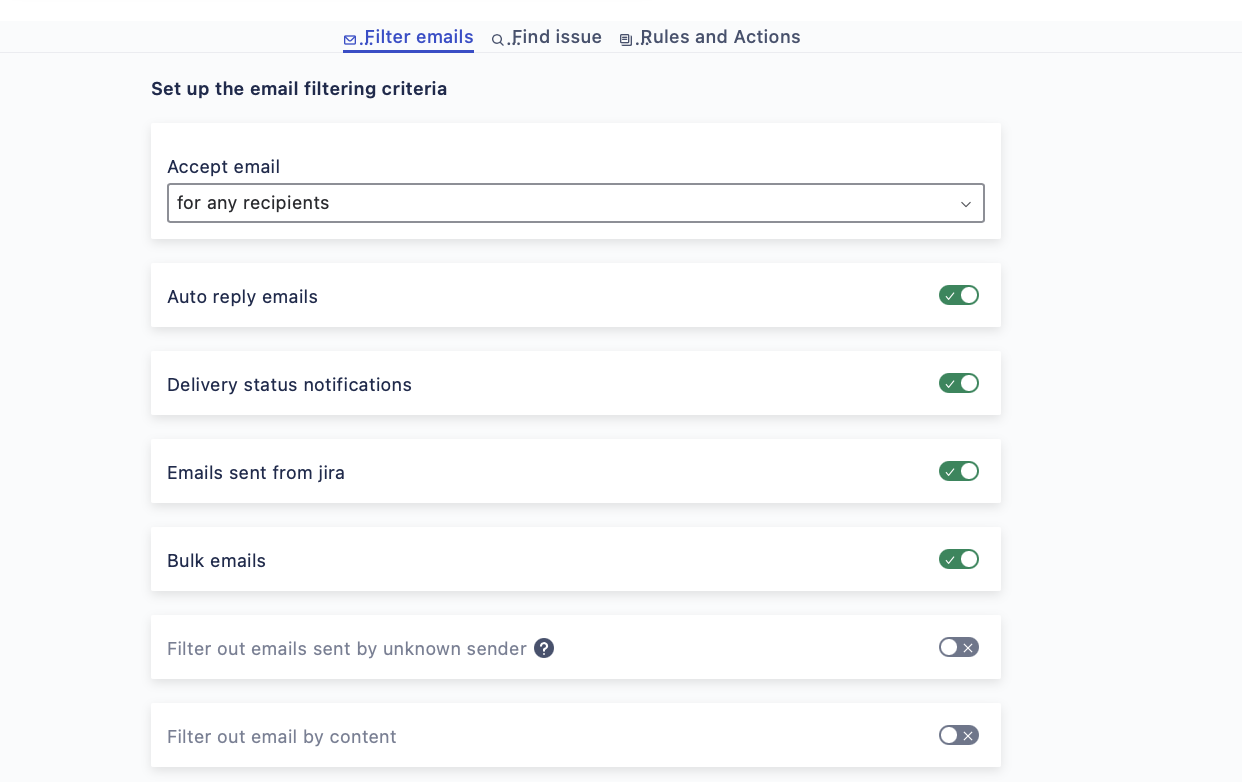
One more thing worth knowing before you go looking at the Filter emails tab yourself: the labelling there is inconsistent. Every toggle on it is a reject filter, but some read as bare nouns and others spell out "Filter out", with no visual distinction between the two styles.
The objects worth naming precisely
Before the causes, it helps to have these apart in your head, because the relationships between them are not visible from any single screen: the Incoming Mail Connection is the plumbing that reads a mailbox; the Mail Handler attached to it is the logic, with separate Filter emails, Find issue and Rules and Actions tabs; the Outgoing Mail Connection is separate plumbing for sending; the Email Notification Scheme holds the actual notifications that decide who gets told what; and Advanced Email Configuration is a project-level object that nothing else visibly depends on, until you read cause two.
The Notification Suppressed Because the Recipient Is the One Who Triggered It
Symptom. A notification fires correctly for tickets raised through the customer portal, and does nothing for tickets created by the mail handler, on the same project, same notification scheme, same event.
What is actually happening. Email This Issue's own notification layer removes the user who triggered an event from that event's recipient list, on the reasoning that you do not notify someone of their own action. The mail handler executes as the sender of the inbound email. If the sender is the reporter, and the notification is addressed to Reporter, the recipient list has exactly one entry, and that entry is the person who just triggered it. It gets removed. Nothing is left to send to — though "nothing" is not quite the same as "nowhere," see the note below.
How to confirm. Add a named user alongside Reporter on the notification. If that named user receives it and the reporter does not, this is the cause.
The fix. On the notification's Additional Settings tab, turn Include own changes to On. This is an Email This Issue setting on its own notification object, not a core Jira scheme setting (native Jira has a separate, per-user "notify me of my own changes" preference, which is a different mechanism entirely and won't fix this).
Why it is not obvious. The setting reads like a preference about whether you want to be told about your own edits in the issue view. It does not read like a condition that can zero out an entire notification's recipient list. It is not a guess: Email This Issue's own documentation states plainly that with this toggle off, no notification goes to the user triggering the action, and its own FAQ names this exact scenario — reporter as recipient, mail handler as trigger — as a known cause of a "No recipients" failure.
The email with zero recipients does not vanish untracked: Email This Issue's own documentation says it piles up in Outgoing Mails → Error Queue, logged with a "No recipients" reason. Nobody watches that queue by default, so in practice it behaves exactly like a silent failure — the customer never knows anything happened and nothing alerts you — but if you go looking, the evidence is there. Add the Error Queue to your list of surfaces worth checking, alongside the ones further up this page.
Turning the toggle on means the reporter is now notified of their own subsequent actions too, not just the one this fix was aimed at. For a creation acknowledgement that is exactly what you want. For a comment notification it means a customer gets an email echoing their own reply straight back to them, which is not. If that happens, configure the comment notification separately rather than assuming one setting covers both, or use the mail handler's own auto-reply action for acknowledgements instead, which bypasses this suppression entirely and sidesteps the echo.
The Server and Data Center product had a recipient type that took the raw From address off the inbound email directly, which survives this suppression because it is not going through the triggering-user mechanism at all. Cloud has no equivalent recipient type. So a long-standing Server configuration that relied on it does not port across, and nothing in the migration tooling tells you that — you only find out when the first mail-handler-raised ticket goes silent.
The Notification With Nowhere to Go
Symptom. With more than one outgoing connection configured on the instance, notifications for a second project simply do not arrive. The first project continues to work.
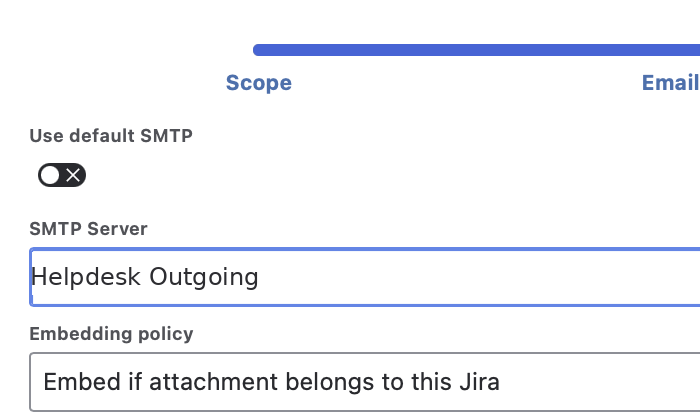
What is documented. A project's notifications can be bound to a specific outgoing connection by an Advanced Email Configuration object, scoped to that project, with Use default SMTP off and an explicit SMTP Server set on its Advanced tab. Without one, Email This Issue's own documentation says the project's mail should route through whichever connection is marked Default, not fail outright. If that default connection genuinely cannot deliver, the message should land in the Error Queue and show as FAILED in the Email Audit Log. So on paper, this should never be a silent, trace-free failure.
What I actually saw. It was. No error, nothing in the audit log, nothing in message trace, on a live instance with a second project and no Advanced Email Configuration for it. I am stating that plainly because it contradicts the documented fallback above, and I would rather flag the conflict than quietly edit my own notes to match the docs after the fact. Whether that was a version quirk, a misconfigured Default connection on that instance, or something else I did not isolate, I cannot say with confidence. What I can say is what fixed it.
The fix. Create an Advanced Email Configuration for the project and set its SMTP server explicitly on the Advanced tab, rather than relying on the default to pick up the slack.
Why it is not obvious. Nothing in the notification scheme or the connection itself hints that a separate per-project object governs routing, and the documented behaviour tells you the absence of this object is survivable. Check the Error Queue and the Audit Log first, because they should show you something if the documented fallback is working. If they are genuinely empty too, you are in the same place I was: give the project an explicit Advanced Email Configuration rather than trusting the default to cover it, and move on.
The Customer Who Cannot Comment on Their Own Ticket
Symptom. A reply from a customer fails to land as a comment, despite their account being correctly configured and in the right customer organisation. Creating the ticket worked. Agents commenting on it works. Only the customer's own reply fails.
What is actually happening. A portal customer has no general Jira permission scheme access at all. Their ability to see and act on an issue comes entirely from that issue being a request visible in their portal, and that requires a Request Type to be set on the issue. A ticket created as a plain issue type by the mail handler, rather than through the portal, can be left with no Request Type set, which leaves it invisible to the customer in the one way that matters: they cannot act on it, even though they can apparently see it exists.
How to confirm. Open the ticket and check the Request Type field. Empty is the tell. The execute-handler log is explicit about what then happens when the mail handler, running as the resolved customer, tries to add the comment anyway:
WARN  Request type is not set for the issue.
ERROR Could not execute 'Add comment' with customer '<sender>':
      REST call resulted abnormally: 403, Forbidden
ERROR Last handler action failed, stop further processing.
A distinction worth making. That 403 is what the API call in the handler log shows, not necessarily what a customer sees if they are typing directly into the web portal rather than replying by email. Atlassian's own documentation of the equivalent portal-side failure describes a generic "we couldn't submit your request" message, not a raw 403, and notes that in that specific path the comment can still end up added despite the error showing. In the mail-handler path above, it does not: the handler log is explicit that processing stops and nothing further happens. Same root cause, two different failure textures depending on which door the customer came through.
The fix. Set a Request Type on the mail handler's Create issue action, and backfill the Request Type on any existing tickets that were created without one.
Why it is not obvious. Creation succeeds because it runs as a privileged service account. Agent comments succeed because agents are licensed users with ordinary permission scheme access. Only the customer's reply exercises the portal-visibility path, so this is the one failure that is completely invisible unless you are testing as the customer.
Bulk-editing the Request Type on existing tickets fires customer notifications for every one of them. The per-operation "don't send notifications" checkbox on a bulk edit does not suppress customer notifications specifically, only some of the agent-facing ones. Turn off outgoing mail for the project entirely before the backfill, do the backfill, then remember to turn it back on. Forgetting the second half is how a quiet fix becomes a very visible one.
The Reply That Goes to an Address Nobody Reads
Symptom. Customers say they replied. Nothing comes back. Every test you run shows the From address on outgoing mail is exactly right.
What is actually happening. A Reply-to address set somewhere in the stack. Per the mail standard, Reply-To is only ever a suggestion to the receiving client, not a requirement, but most clients honour it by default and without surfacing it to the user, so the customer sees a correct-looking sender address, hits reply, and their mail client sends it somewhere else entirely, to an address you may not even be monitoring. A few clients are known to ignore it in some configurations and reply to From instead, which is its own source of confusion if you are expecting the redirect to be universal.
Where to look. There are three separate places a Reply-to address can be set, and a silent redirect can come from any of them: the project's native Channels & self service → Email reply-to address, which is a Jira Service Management setting independent of Email This Issue; the Reply-to Address field on the Email This Issue Outgoing Mail Connection itself; and the Reply-To pattern on an Advanced Email Configuration. Check all three before concluding you have ruled it out.
The fix. Clear or correct whichever of the three is carrying the wrong address, so customers only ever receive mail from the one address you actually read.
Why it is not obvious. You will check the From address repeatedly, because that is the header everyone checks first, and it will be correct every time. The header that actually decides where the reply lands is a different one, and nothing in the send confirmation points you at it, or at which of the three places set it.
The Real Reply Rejected as a Robot
Symptom. A customer's genuine reply, typed by a person, gets rejected by the auto-reply filter as if it were an automated bounce.
What is actually happening. Some customer-side helpdesk platforms route every piece of outbound mail, including a human agent's typed reply, through their own notification engine, and that engine stamps Auto-Submitted: auto-generated on it regardless of whether a person wrote the content. Zendesk is a documented example: it stamps outbound mail as automated by design. Nothing on your side is doing this to that sender's mail; the header originates entirely with the sender's platform, before it ever reaches your mailbox. The auto-reply filter is correctly reading the header it was given, and the header is simply wrong about what it is describing. This applies in the other direction too, which is worth knowing before you assume your own outbound is exempt: Jira itself has, by default, added Auto-Submitted to its own outgoing notifications since a long-standing platform change, including notifications that quote a human-typed comment. A Jira-to-Jira or Jira-to-ETI reply chain can trip the same filter on both ends.
The tension worth being honest about. The filter exists to prevent mail loops, and that protection is real and worth keeping. Turning it off reopens the loop risk instance-wide. But as configured, it is discarding genuine correspondence from a specific sender, which is the worse failure of the two. Because the header originates with their platform and not yours, you cannot fix it at the source. The workable options are a sender-scoped exception to the auto-reply filter, or a transport rule on your own mail path that strips the header specifically for mail from that sender before it reaches the filter. There is no clean fix here, only a trade you make deliberately rather than by accident.
The Connection That Goes Back to Sleep
Symptom. An outgoing connection was working. Hours later, agents cannot send, and OutgoingConnectionDisabledException appears wherever sends are logged.

What is documented, for the sibling object. Email This Issue's own documentation confirms exactly this pattern — created disabled, reverted to disabled on edit, no warning on screen — but says it of incoming mail connections specifically. I found nothing in the documentation about outgoing connections behaving the same way.
What I actually saw. It was the outgoing connection, not the incoming one, and it was repeatable: enabled, working, edited, found disabled hours later, with an OutgoingConnectionDisabledException as the symptom. Two readings are possible. Either the undocumented outgoing behaviour mirrors the documented incoming one and the docs simply don't mention it, or something else on that instance was reverting it and I never isolated what. I have not had either explanation confirmed, so I am presenting the pattern as real and the cause as open, rather than asserting a mechanism I cannot back up.
The practical response, which holds regardless of the cause. After editing any connection, incoming or outgoing, check its status, re-enable it if needed, and send a test before you walk away. Make that a habit rather than a one-off check, because the consequence of skipping it is agents who cannot send and no warning that it happened.
The First Enable That Floods the Project
Symptom. Enabling an incoming connection against a mailbox that already has mail sitting in it creates hundreds of tickets in one go.
What is actually happening. The first run of a newly enabled incoming connection processes everything already sitting in the target folder, read mail included, not just what arrives from that point forward. Email This Issue's own documentation says so directly: on a production mailbox that already holds mail, "read or unread," remove what you do not want processed, because the first round downloads every email in the target folder. That matched what I saw: the ticket count on first enable was the mailbox's existing backlog, not the volume of genuinely new mail.
The fix. Clear the mailbox, or move existing mail out of the target folder, before the first enable. Read the estimate dialog the connection shows you before you click through it; it is telling you the actual number before it happens, and it is worth believing.
Two Smaller Ones, Worth a Line Each
Not every failure earns a full section. These two are real, and genuinely caught time, but they are testing gotchas and small leftovers rather than configuration faults, so they get an aside instead of being stretched to match the shape above.
Test mail from the ingest address never arrives anywhere
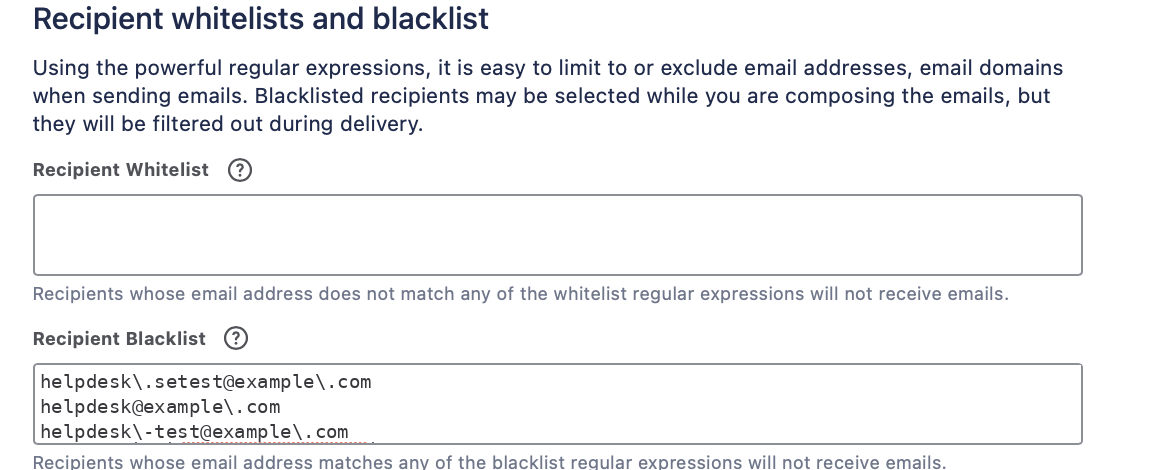
The ingest mailbox address is blacklisted from receiving the app's own outbound mail. The likely reason is reply-all protection against a loop, though that is a read of the behaviour rather than a confirmed design statement from the vendor. Confirmed or not, the side effect is the same: you cannot test the round trip by emailing in from the ingest address itself. Test from a genuinely external address instead. If every recipient on an email happens to be blacklisted, the same "No recipients" Error Queue entry from earlier in this piece is where it will show up, rather than nowhere.
The leftover test prefix that survives into production
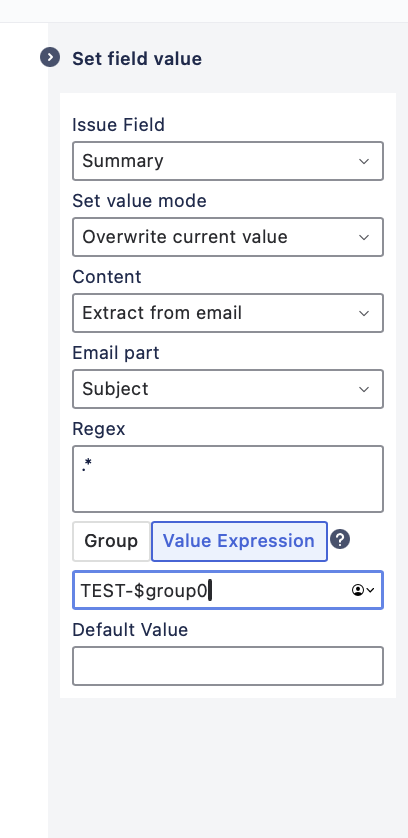
A value expression used while building the handler contained a literal test string that got prepended to every ticket summary. Nothing errored, nothing logged a warning. It just looked wrong, on every ticket, until someone opened the field and noticed. Worth a last look at your value expressions before you call a handler finished.
Standing Advice, Read Before You Build a Handler
If you are moving an existing mailbox onto the app rather than building a new one, the companion piece, Migrating a Mailbox onto Email This Issue, covers the survey, the build order, the testing and the cutover sequence.
- One reader per mailbox. Check every place a reader could be hiding before you enable a new one against an existing mailbox.
- Disable the old reader before enabling the new one. Never run both against the same mailbox at once.
- After editing any connection, re-enable it and send a test, every time, as a habit rather than a judgement call.
- Every project needs its own Advanced Email Configuration. The first one works by default on the shared connection, and that success will mislead you about the second.
- Clear the mailbox, or the target folder, before the first enable.
- A clean handler log tells you nothing about whether a notification, or any outbound mail, actually went. They are separate subsystems with separate logs.
- Test as the customer, from an external address with none of your own privileges. An administrator testing with their own account is the one case where several of these failures do not reproduce.
- Check what the customer actually receives and can actually do, not what you configured. A 403 on their side is invisible from yours.
Closing Thoughts
Every one of these shares the same shape: something is configured, nothing is obviously wrong, and the mail simply does not move. None of them throw an error where you would be looking, because from the system's point of view nothing failed — a recipient list with one entry correctly had that entry removed, a customer with no Request Type correctly has no portal permission, a connection correctly used the default it was given. The system is behaving largely as designed in every case. The design just has more moving parts, and more unwatched queues, than the screen in front of you shows.
The diagnostic habit that generalises across all seven: decide which surface would have recorded the thing you are missing, and check whether it is actually empty or whether you were looking at the wrong one, including the Error Queue, which most people forget exists until it is the only place with an answer. A clean handler log and a missing notification are not in tension. They are two different subsystems, and only one of them just told you anything. And twice in this piece, I checked the surface the documentation says should hold the answer and found it genuinely empty anyway — which is its own lesson: the method holds even when a specific vendor claim about where the evidence lands does not.
← All guides